

Chapter-1 Overview– OSI & TCP/IP
Understanding Computer Networks
The Computer Network Movie
A computer network is a system where multiple computers and devices are connected to share resources, communicate, and transfer data. Think of it like how your mobile phone connects to Wi-Fi to stream videos or send messages. 😊
Let’s break down different parts of this concept step-by-step.
1. Applications of Computer Networks
Computer networks are everywhere and have countless applications. Here are a few ways they make our lives easier:
- Communication:
Apps like WhatsApp, Instagram, and Zoom use networks to send messages or host video calls. Without networks, these apps wouldn’t work. - Sharing Resources:
Offices use networks to connect printers, making it easy for any computer in the office to print a document. - E-commerce:
Websites like Amazon and eBay allow people to shop online by using internet networks to place orders and receive updates. - Cloud Services:
Google Drive and Dropbox store your files online, letting you access them from any device with an internet connection.
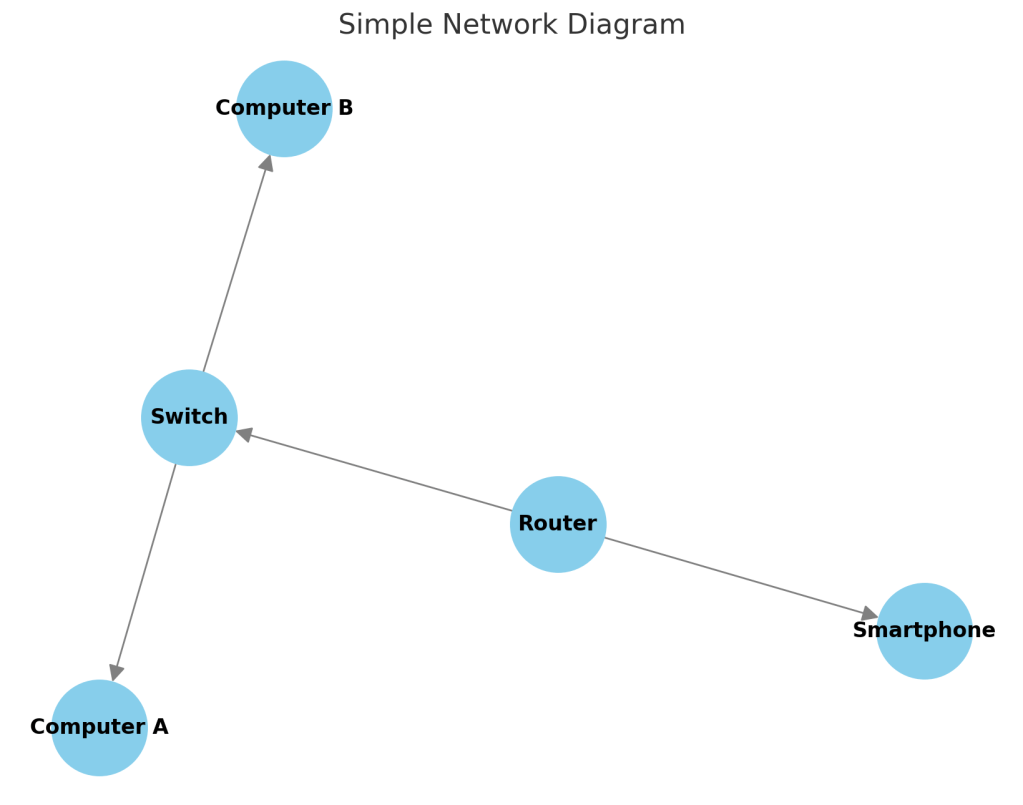
🖼️: Devices (laptops, smartphones, printers) all connected through Wi-Fi to a central server or router.
2. Network Hardware
Network hardware includes physical devices that help computers communicate. Here’s a quick overview:
- Router:
A router connects multiple devices to the internet. It’s like a traffic controller, ensuring data gets sent to the right places. Example: Your home Wi-Fi router. - Switch:
Think of a switch as a device that connects many computers within a local network (e.g., all computers in a school lab). - Cables and Wireless Signals:
These carry data between devices. For example, Ethernet cables provide faster, stable internet connections, while Wi-Fi offers convenience.
🖼️ : Devices like routers, switches, and computers connected through cables and wireless signals.
3. Network Software
Networks also need software to define how data is sent and received. This is where protocols come in.
Protocol Hierarchy
A protocol is like a set of rules that computers follow when communicating. Protocols are organized into layers, known as the protocol hierarchy.
For example, sending an email involves these steps:
- The message is broken down into small parts (data packets).
- Protocols guide these packets through the internet.
- The recipient’s computer reassembles the packets to show the email.
Connection-Oriented vs. Connectionless Communication
- Connection-oriented: Like a phone call, a connection is established before data is sent. Example: Video calls.
- Connectionless: Like sending a text message, data is sent without setting up a connection. Example: Sending an email.
Service Primitives
Service primitives define operations for communication, like:
- Request: When one device asks for a service.
- Indication: When a device is notified of a request.
- Response: When the requested service is carried out.
Think of it as a “call and response” between devices. 📞
4. Reference Models: OSI and TCP/IP
Networks follow reference models to ensure different devices and software can work together.
OSI Model (Open Systems Interconnection)
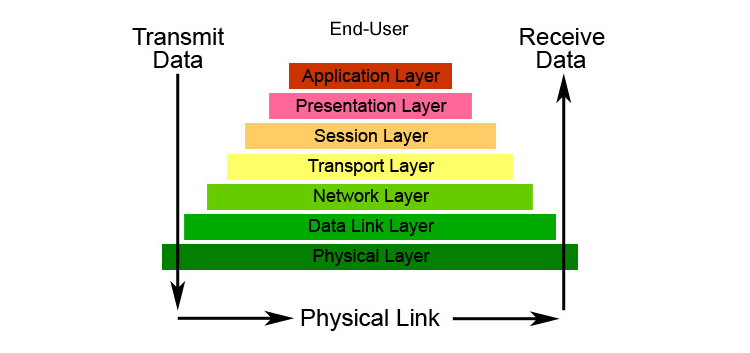
The OSI model has 7 layers, each handling a different part of data transmission. Here’s a simple analogy:
- Physical Layer: Wires or Wi-Fi signals (like roads for data).
- Application Layer: Apps like Zoom or WhatsApp (users of data).
What is TCP/IP Model ?
Understanding the TCP/IP Model in Simple Terms 😊
The TCP/IP model is like a postal system 📬 for the internet. It helps computers communicate with each other just like how people send letters or packages from one place to another. Let’s break it down step by step using a simple example.
Think of It Like Sending a Parcel 📦
Imagine you want to send a gift 🎁 to your friend who lives in another city. You need to follow some steps to ensure it reaches safely. The TCP/IP model also works in steps, which we call layers.
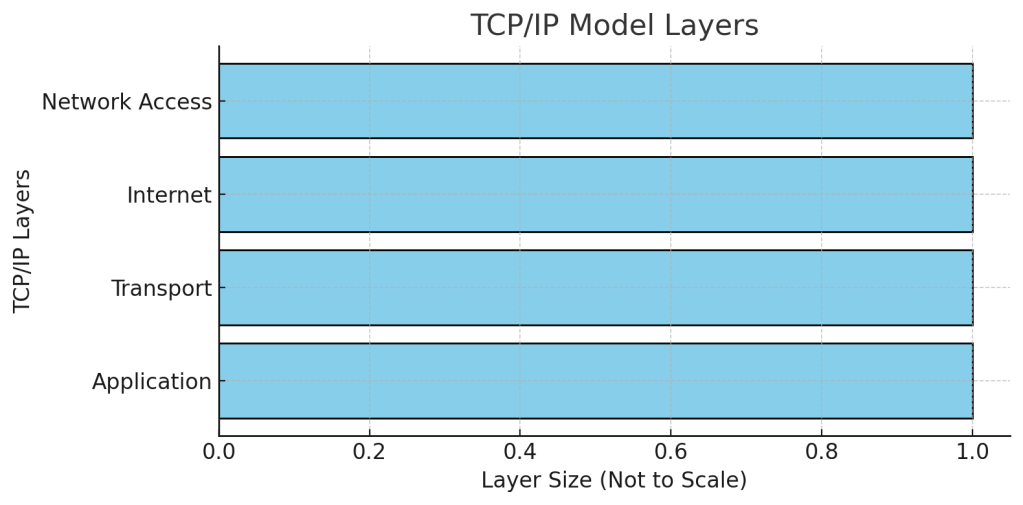
TCP/IP Model has 4 Layers:
💡 Each layer has a specific job, just like different departments in a postal system.
1️⃣ Application Layer (The Sender 🧑💻)
- This is where communication starts.
- Think of it as you writing a letter ✉️ or packing a gift 🎁 for your friend.
- Examples: Web browsing (HTTP), Email (SMTP), WhatsApp messages
2️⃣ Transport Layer (The Courier Service 🚚)
- Ensures safe delivery of your message.
- Like choosing a delivery service (FedEx, DHL, etc.) to send your parcel.
- TCP (like a premium courier) ensures delivery, tracking, and receipt.
- UDP (like normal mail) is faster but doesn’t guarantee delivery.
3️⃣ Internet Layer (Addressing & Routing 🏠📍)
- Assigns addresses (like home addresses 🏠) to send data to the right place.
- Works like a postal office ensuring your parcel goes to the correct city and house.
- Uses IP (Internet Protocol) for addressing.
4️⃣ Network Access Layer (The Delivery Person 🚴)
- Responsible for physically sending the data through wires, Wi-Fi, or cables.
- Just like a postman 📮 delivering your package to your friend’s doorstep.
Summary (Easy to Remember!)
📦 Packing the Gift (Application Layer) → 📮 Choosing Courier (Transport Layer) → 🏠 Addressing it (Internet Layer) → 🚴 Delivering it (Network Access Layer)
This is how the TCP/IP model makes sure your messages, emails, and web pages reach the right destination! 🌍💻
TCP/IP is simpler with only 4 layers and is the backbone of the internet. Example: When you open a website, TCP breaks data into packets, and IP finds the best route to send them.
🖼️: Comparison between OSI (7 layers) and TCP/IP (4 layers) models with examples.

5. Example Networks: The Internet
The Internet is the world’s largest network. It connects millions of networks globally. Examples:
- Social Media: Facebook and Twitter rely on the internet.
- Streaming: Netflix and YouTube use high-speed networks to stream videos.
6. Network Standardization
Standards ensure that all devices and networks can communicate smoothly. Examples include:
- Wi-Fi standards (802.11): Allows devices to connect wirelessly.
- HTTP/HTTPS: Rules for loading web pages.
Without standards, your phone might not connect to certain Wi-Fi networks.
7. Network Performance
When we use networks, we want them to be fast and reliable. Performance depends on factors like bandwidth and latency.
Bandwidth and Latency
- Bandwidth: The amount of data that can be sent in a given time.
Example: A 100 Mbps connection can download files faster than a 10 Mbps connection. - Latency: The delay before data starts transferring.
Example: High latency causes lag during video calls.
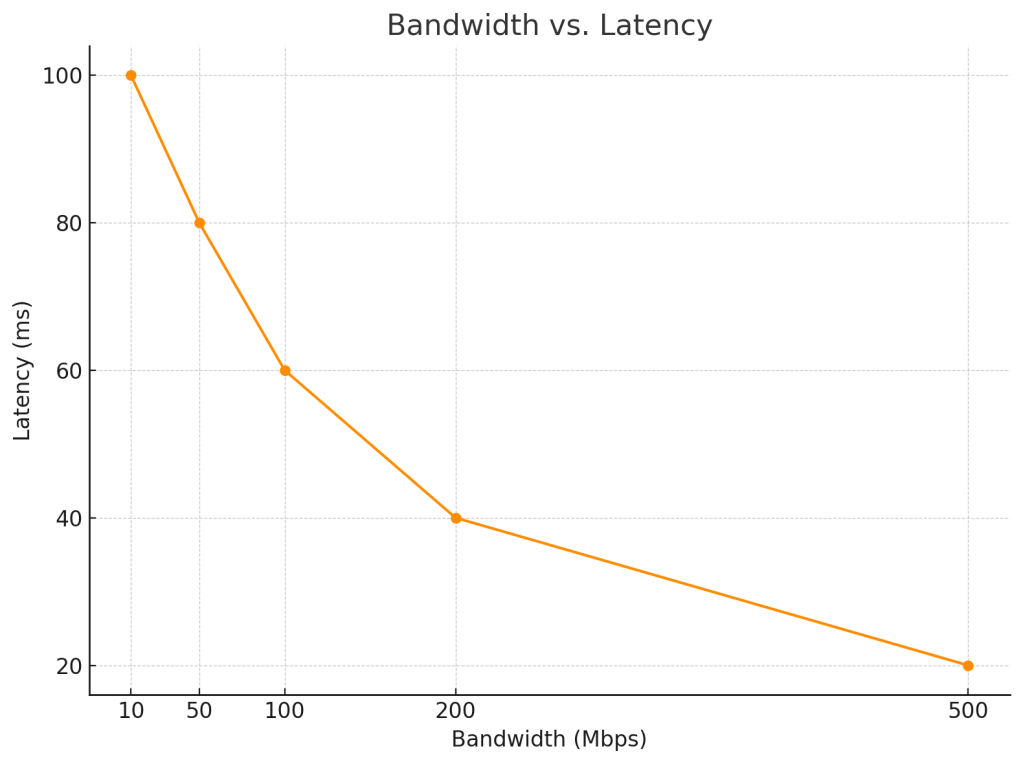
Delay and Bandwidth Product
The delay-bandwidth product measures how much data can be in transit at a time. It’s crucial for streaming services to avoid buffering.
Example: Netflix adjusts video quality based on your internet speed to provide smooth streaming.
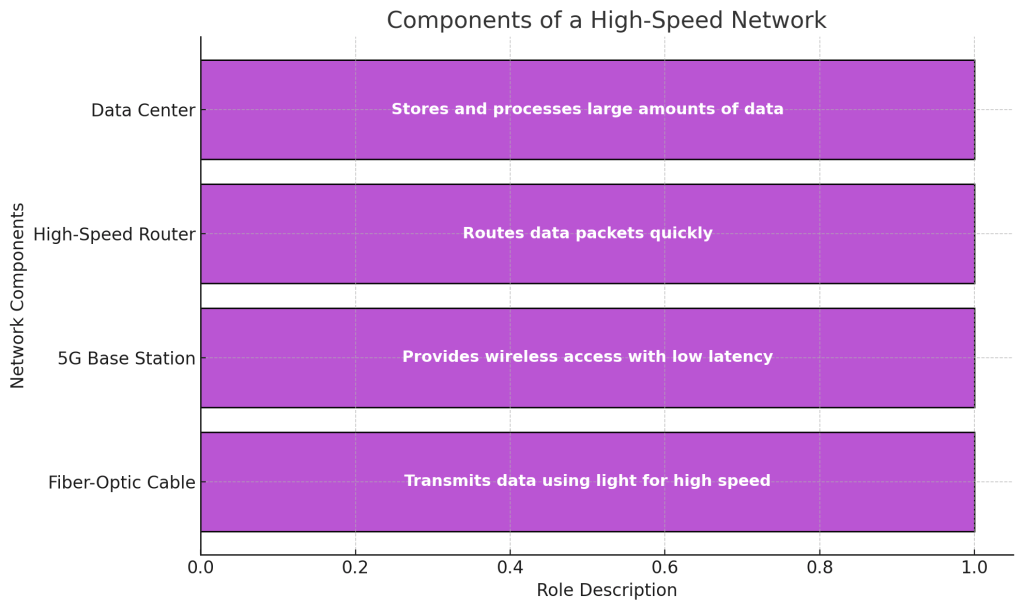
8. High-Speed Networks
Modern networks, like 5G and fiber-optic internet, offer higher speeds and lower latency. These are essential for applications like:
- Online Gaming: Real-time interaction needs minimal delay.
- VR and AR: Virtual experiences require fast data transfer.
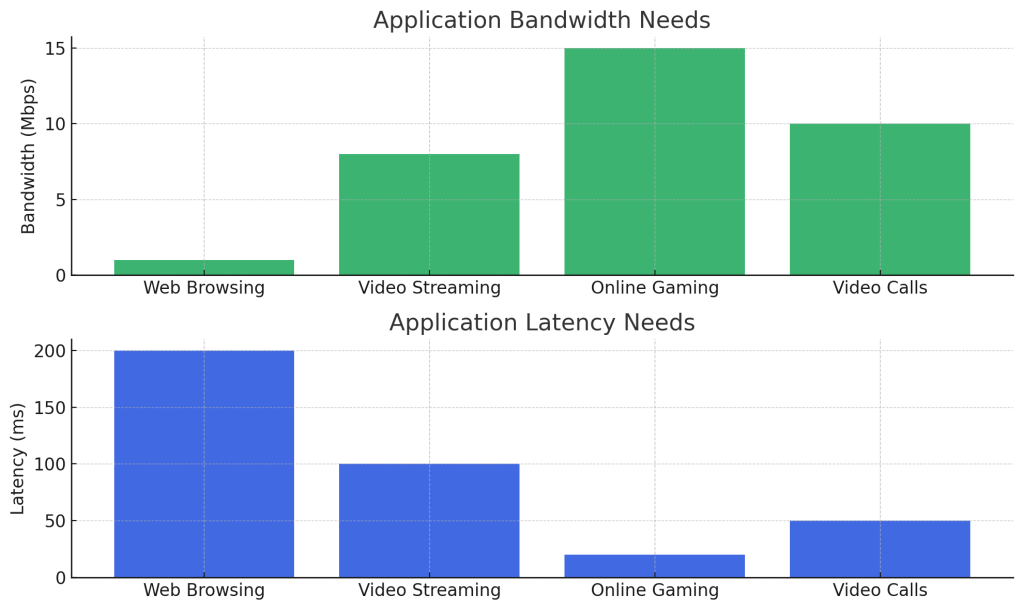
9. Application Performance Needs
Different applications have different performance needs. For example:
- Web Browsing: Prioritizes quick loading of text and images.
- Video Streaming: Needs high bandwidth to provide clear, uninterrupted videos.
- Online Meetings: Requires both low latency and high bandwidth for real-time communication.
Summary

Computer networks are the backbone of modern technology, connecting devices to enable communication, resource sharing, and access to online services. By understanding key concepts like network hardware, protocols, and performance factors, we can better appreciate how networks make everyday applications possible. 🌐
LAN Technologies:
1. Introduction to LAN Technologies
A Local Area Network (LAN) is a network that connects computers and devices within a small geographical area, such as a school, office, or home. It allows devices to share resources (like printers) and communicate with each other.
Think of a LAN like the school’s computer lab! Each computer is connected to others and can print from the same printer. Cool, right? 🌐
Now, let’s explore the different technologies used in LANs.
2. X.25 (Early Networking Technology)
X.25 was one of the first widely used networking protocols. It allowed computers to communicate over public telephone lines.
- How it works: Data is broken into packets and sent through multiple routes to reach its destination.
- Real-life analogy: Imagine sending several pieces of a puzzle in separate envelopes to a friend who puts them together. 📧
- Fact: X.25 was popular in the 1980s but has mostly been replaced by newer technologies.
3. Frame Relay
Frame Relay is a packet-switching technology that improves upon X.25 by offering faster speeds.
- Key idea: Data is sent in frames (small units), reducing delays.
- Example: Businesses used Frame Relay to connect branch offices before modern internet services.
- Fun fact: It paved the way for technologies like MPLS (used by many internet providers today).
4. ATM (Asynchronous Transfer Mode)
ATM is a high-speed networking technology that uses fixed-size packets (cells) for data transfer.
- How it works: Data is sent in 53-byte cells, ensuring fast, predictable transmission.
- Use case: ATM was used in early broadband services for smooth video streaming.
- Analogy: Think of ATM as an express train with fixed stops, keeping things on schedule. 🛲
5. Ethernet (802.3)
Ah, Ethernet, the backbone of modern LANs! 💪 It is the most common technology used to connect devices within a LAN.
- How it works: Devices on an Ethernet network use cables to send data through a switch or router.
- Example: Your computer’s wired internet connection likely uses Ethernet.
- Fun fact: Ethernet can now handle speeds up to 100 Gbps! That’s fast enough to download an HD movie in seconds. 📹
6. FDDI (Fiber Distributed Data Interface)
FDDI uses fiber-optic cables to connect devices in a LAN or metropolitan area network (MAN).
- Why it’s special: It can span longer distances and handle high data speeds.
- Example: Universities use FDDI to connect multiple buildings on campus.
- Did you know? Fiber-optic cables transmit data using light, making them immune to electrical interference. 🌤
7. Token Ring
In a Token Ring network, devices are arranged in a circle. A special packet, called a token, circulates and grants permission to transmit data.
- How it works: Devices wait for the token before sending data, preventing collisions.
- Example: Early office networks used Token Ring to avoid data traffic jams.
- Fun fact: Token Ring was eventually replaced by faster Ethernet networks.
8. Resilient Packet Ring (RPR)
RPR is designed for high-speed data transfer in metropolitan area networks.
- Key feature: It provides redundancy, meaning if one path fails, data is rerouted automatically.
- Analogy: Imagine a roundabout with multiple exits; if one exit is blocked, you can take another route. 🚧
9. Wireless LANs (Wi-Fi, 802.11)
Wi-Fi is a wireless technology that allows devices to connect to a LAN without cables. 🛡
- How it works: Devices connect to a router using radio waves.
- Example: The Wi-Fi you use at home or in coffee shops.
- Fact: Modern Wi-Fi (802.11ax) can handle multiple devices and speeds over 1 Gbps.
- Interactive question: Can you guess how many devices are connected to your Wi-Fi right now? 🤔
10. Cell Phone Technologies
Cell phones rely on cellular networks to communicate. These networks consist of interconnected towers that cover large areas.
- Technologies: 4G, 5G.
- Fun fact: 5G can reach speeds over 1 Gbps, making it ideal for streaming and gaming on the go. 🌐
11. Broadband Wireless (WiMAX, 802.16)
WiMAX provides high-speed wireless internet over long distances.
- Use case: Rural areas where traditional broadband isn’t available.
- Analogy: Think of WiMAX as a super-powerful Wi-Fi signal that can travel miles! 🇰
12. Bluetooth (802.15.1)
Bluetooth is a short-range wireless technology used to connect devices like headphones, keyboards, and smartwatches.
- Range: Typically up to 10 meters.
- Example: Pairing your phone with wireless earbuds.
- Fact: Bluetooth is named after a Viking king, Harald Bluetooth, known for uniting tribes. 🐟
13. RFID (Radio-Frequency Identification)
RFID uses radio waves to identify and track objects.
- How it works: RFID tags store data that can be read by scanners.
- Example: Contactless payment cards and inventory tracking in warehouses.
- Did you know? RFID tags are used in marathon races to track runners’ times. ⛰
- Overview:
- RFID uses radio waves to automatically identify objects.
- Types:
- Passive RFID – No battery, activated by a reader.
- Active RFID – Has a battery for long-range tracking.
- Applications:
- Inventory tracking 🏭
- Electronic toll collection 🚗
- Security access cards 🏢
14. Summary
We’ve explored various LAN technologies, each with unique features and applications. From Ethernet cables to Wi-Fi and Bluetooth, these technologies keep our world connected. Which technology do you use the most in your daily life? 📝
Feel free to ask questions and discuss examples from your own experiences. Let’s keep learning together! 💡
Chapter-2 LAN Technology
Understanding Various LAN Technologies in Simple Terms 😊
Local Area Networks (LANs) are like the nervous system of a small area—such as a home, office, or building—connecting various devices to communicate efficiently. Let’s explore some common LAN technologies using simple analogies and everyday examples. Local Area Networks (LANs) are a crucial part of modern networking, connecting computers and devices within a limited area like homes, offices, or campuses. LAN technologies define how data is transmitted, structured, and managed efficiently. This chapter explores key LAN technologies from Ethernet to RFID.
1. Ethernet (IEEE 802.3) 🌐
Analogy: Think of Ethernet as the roads connecting houses in a neighborhood.
Explanation: Just as roads allow cars to travel between houses, Ethernet cables (like Cat5 or Cat6) connect computers and other devices, enabling them to share data. It’s one of the most widely used LAN technologies due to its reliability and speed.
Ethernet is the most widely used LAN technology, providing wired connectivity for devices. It follows the IEEE 802.3 standard and is known for its reliability, speed, and scalability.
Features:
- Supports CSMA/CD (Carrier Sense Multiple Access with Collision Detection) to manage network traffic.
- Available in different speed variants: 10 Mbps, 100 Mbps (Fast Ethernet), 1 Gbps, 10 Gbps, and beyond.
- Uses MAC (Media Access Control) addressing to identify devices uniquely.
Ethernet Frame Structure:
- Preamble – Synchronizes communication.
- Destination Address – Identifies the recipient.
- Source Address – Identifies the sender.
- Type/Length – Defines the protocol used.
- Data – Contains actual information.
- FCS (Frame Check Sequence) – Checks for errors.
Applications:
- Used in home and office networking.
- Backbone of corporate networks and data centers.
2. Wi-Fi (IEEE 802.11) 📶
Analogy: Wi-Fi is like the invisible airwaves that let us listen to the radio anywhere in our home.
Explanation: Wi-Fi allows devices to connect to the network wirelessly, providing the convenience of mobility without the need for physical cables. It’s commonly used in homes, cafes, and offices to access the internet and share resources.
Overview:
Wi-Fi enables wireless networking over short distances using radio signals.
Features:
- Supports speeds from 11 Mbps (802.11b) to 9.6 Gbps (802.11ax).
- Uses Access Points (APs) to connect multiple devices.
- Supports different frequency bands: 2.4 GHz, 5 GHz, and 6 GHz.
Security Protocols:
- WEP (Weak, outdated) 🛑
- WPA, WPA2, WPA3 (Modern, secure) 🔒
Applications:
- Used in homes, offices, airports, and public hotspots.
3. Bluetooth (IEEE 802.15.1) 🔵
Analogy: Imagine Bluetooth as a short-range whisper between two devices.
Explanation: Bluetooth enables devices to communicate over short distances without cables, like connecting your smartphone to wireless earbuds. It’s ideal for personal devices that need to exchange data over a limited range.
Overview:
Bluetooth enables short-range wireless communication between devices.
Features:
- Operates at 2.4 GHz.
- Range of 10m – 100m.
- Low power consumption.
Applications:
- Wireless headphones 🎧
- Smart home devices 🏠
- Fitness trackers ⌚
4. Token Ring 🟢🔄
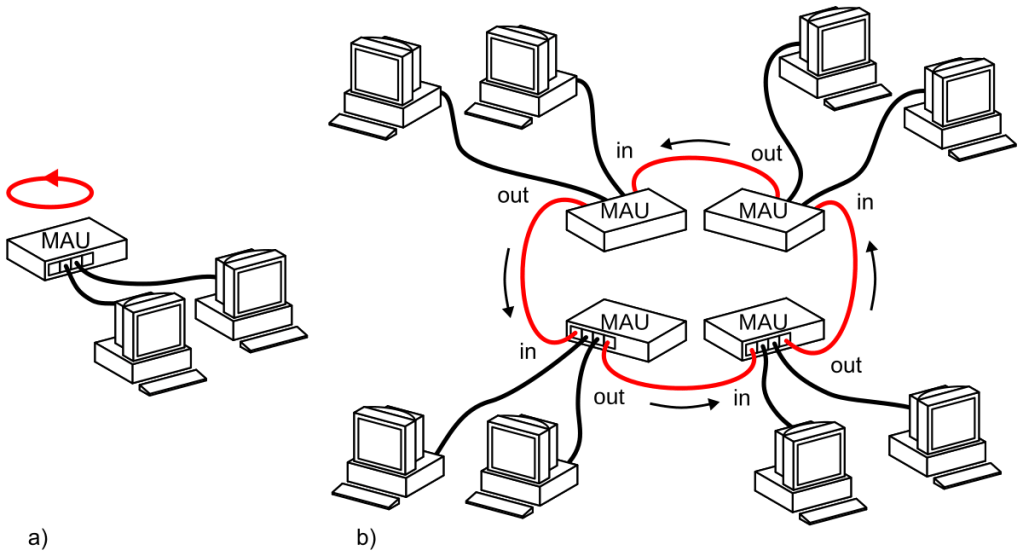
Analogy: Think of Token Ring as a group of people passing a talking stick; only the person holding the stick can speak.
Explanation: In a Token Ring network, a token (a small data packet) circulates around the network. A device can only send data when it has the token, preventing data collisions and ensuring orderly communication.
Overview:
Token Ring is a networking technology that ensures collision-free communication by using a special token-passing mechanism.
Features:
- Operates at 4 Mbps or 16 Mbps.
- Uses a logical ring topology (although physically arranged in a star topology).
- Only the device holding the token can send data, preventing collisions.
Advantages vs. Disadvantages:
| Feature | Token Ring ✅ | Ethernet ❌ |
|---|---|---|
| Collisions | No collisions 🚫 | Uses CSMA/CD, possible collisions ⚠️ |
| Efficiency | Efficient in high-load networks 📊 | Less efficient under heavy traffic 🏎️ |
| Scalability | Not easily scalable 📏 | More scalable 🔄 |
Applications:
- Previously used in IBM mainframes but has been largely replaced by Ethernet.
5. Frame Relay 📨
Analogy: Frame Relay is like a postal service that delivers letters without checking for errors.
Explanation: It’s a WAN technology that sends data packets (frames) without performing error correction, relying on end devices to handle errors. This approach makes it faster and more efficient for certain types of data transmission.
6. Asynchronous Transfer Mode (ATM) 🏧📦
Analogy: ATM is like a high-speed conveyor belt that moves small, fixed-size packages.
Explanation: ATM transmits data in fixed-sized cells, making it suitable for voice, video, and data. Its structured approach ensures quality service but can be more complex to implement.
7. Fiber Distributed Data Interface (FDDI) 💡🔄
Analogy: FDDI is like a dual-loop racetrack with cars moving in opposite directions for redundancy.
Explanation: FDDI uses fiber-optic cables arranged in dual rings, providing high-speed data transmission and fault tolerance. If one ring fails, the other can maintain network operation.
Overview:
FDDI is a high-speed fiber-optic network standard designed for large-scale LANs and MANs (Metropolitan Area Networks).
Features:
- Dual-ring topology for fault tolerance.
- Speeds of 100 Mbps.
- Uses Token Passing mechanism.
Advantages:
- Provides high bandwidth for large networks.
- The dual ring ensures network redundancy (if one ring fails, the other remains active).
Applications:
- Used in government, finance, and research institutions for high-speed, long-distance networking.
8. Resilient Packet Ring (RPR) 🔄🔄
Analogy: RPR is like a two-way street that ensures data can flow even if one lane is blocked.
Explanation: RPR uses dual rings to ensure data transmission continues smoothly, even if there’s a break in one ring, making it resilient and reliable for metropolitan area networks.
Overview:
RPR (IEEE 802.17) is a next-gen ring-based networking technology designed for metro networks.
Features:
- Supports high-speed data transmission (1 Gbps and beyond).
- Ensures fast recovery from failures (sub-50ms).
- Supports QoS (Quality of Service).
Applications:
- Used in ISPs, metro Ethernet networks, and backbone infrastructures.
9. WiMAX (IEEE 802.16) 🌆📶
Analogy: WiMAX is like a city-wide Wi-Fi network, providing internet access over long distances.
Explanation: WiMAX offers broadband wireless access across large areas, making it suitable for connecting remote locations where traditional wired connections are impractical.
Overview:
WiMAX is a long-range wireless technology used for broadband internet.
Features:
- Covers distances up to 50 km.
- Speeds of up to 1 Gbps.
- Operates in licensed and unlicensed frequency bands.
Applications:
- Used for rural broadband, emergency communications, and enterprise networking.
10. RFID (Radio-Frequency Identification) 📛📡
Analogy: RFID is like a barcode scanner that doesn’t need a direct line of sight.
Explanation: RFID uses electromagnetic fields to automatically identify and track tags attached to objects, commonly used in inventory management and access control systems.
Types:
- Passive RFID – No battery, activated by a reader.
- Active RFID – Has a battery for long-range tracking.
Applications:
- Inventory tracking 🏭
- Electronic toll collection 🚗
- Security access cards 🏢
11. X.25 📠
Analogy: X.25 is like a traditional postal system that ensures every letter arrives correctly.
Explanation: X.25 is an older network protocol that provides error correction and flow control, ensuring reliable data transmission over less reliable networks.
12. Cellular Network Technologies 📱
Overview:
Cellular networks provide wireless communication over large areas through mobile towers.
Generations:
| Generation | Speed | Features |
| 1G | Analog | Only voice 📞 |
| 2G (GSM) | 64 Kbps | SMS, voice calls 📩 |
| 3G | 2 Mbps | Mobile internet 🌍 |
| 4G LTE | 100 Mbps | Streaming, gaming 🎥 🎮 |
| 5G | 10 Gbps | Ultra-low latency, IoT 🌐🤖 |
Applications:
- Used in mobile communication, IoT, and smart cities.
Chapter-3 Data Link Layer
Data Link Layer: A Simplified Guide
1. Introduction to the Data Link Layer
The Data Link Layer is the second layer of the OSI model. It acts as a bridge between the Physical Layer (Layer 1) and the Network Layer (Layer 3). This layer is responsible for reliable data transmission, error detection, and flow control in a network.
Key Responsibilities of the Data Link Layer:
✅ Framing – Organizing data into manageable units. ✅ Error Control – Detecting and correcting transmission errors. ✅ Flow Control – Preventing fast senders from overwhelming slow receivers. ✅ MAC (Media Access Control) – Determining how devices share the network medium.
📌 Exam Question Example:
- What are the services provided by the Data Link Layer? (Asked in 2023, 2024)
2. Services Provided to the Network Layer
The Data Link Layer ensures that data is transferred efficiently and reliably. It provides the following services to the Network Layer:
1. Unacknowledged Connectionless Service 📡
- Data is sent without confirmation.
- Used in real-time applications where speed is more important than reliability.
- Example: Voice over IP (VoIP) or live streaming.
2. Acknowledged Connectionless Service 📩
- The receiver sends acknowledgments (ACKs) for received data.
- Ensures error detection but no connection establishment.
- Example: Wi-Fi transmission.
3. Acknowledged Connection-Oriented Service 🔄
- Ensures error-free and in-sequence data delivery.
- Connection is established before communication.
- Example: File transfers using TCP/IP.
📌 Exam Question Example:
- Differentiate between Acknowledged and Unacknowledged Services. (Asked in 2023)
3. Framing 🖼️
Framing is the process of dividing data into frames for transmission. Each frame contains: ✅ Header – Includes source and destination addresses. ✅ Payload – Actual data being transmitted. ✅ Trailer – Includes error detection information.
Types of Framing Techniques:
- Byte-Oriented Framing (Character Stuffing)
- Uses special characters to mark frame boundaries.
- Example: ASCII characters.
- Bit-Oriented Framing (Bit Stuffing)
- Uses bit patterns to mark frame boundaries.
- Example: HDLC (High-Level Data Link Control).
- Length-Based Framing
- Uses a length field in the header to define the frame size.
- Example: Ethernet frames.
📌 Exam Question Example:
- Illustrate Byte Stuffing and Bit Stuffing framing techniques with examples. (Asked in 2024)
4. Error Control ❌✅
Error Control ensures that data arrives correctly at its destination.
Types of Errors:
✅ Single-Bit Errors – One bit is altered (e.g., 0 becomes 1). ✅ Burst Errors – Multiple bits are altered.
Error Detection Techniques:
- Parity Check – Adds an extra parity bit to detect errors.
- Checksum – Adds a computed value to verify data integrity.
- Cyclic Redundancy Check (CRC) – Uses a mathematical formula to detect errors.
- Example: Given a bitstream 1101011011 and generator polynomial X⁴+X+1, CRC can be computed to detect errors.
Error Correction Techniques:
- Forward Error Correction (FEC) – The receiver corrects errors using redundant data.
- Automatic Repeat Request (ARQ) – The sender retransmits data when an error is detected.
📌 Exam Question Example:
- Given a bitstream and generator polynomial, calculate CRC. (Asked in 2024)
5. Flow Control 🔄
Flow Control prevents the sender from overwhelming the receiver with too much data at once.
Flow Control Methods:
- Stop-and-Wait Protocol
- The sender waits for an ACK before sending the next frame.
- Simple but slow.
- Sliding Window Protocol
- Allows multiple frames to be sent before requiring an ACK.
- Improves efficiency in high-speed networks.
- Example: If a sender transmits 8 frames and receives an ACK for frame 6, in Go-Back-N ARQ, the sender must retransmit frames 6, 7, and 8.
Comparison of Flow Control Methods:
| Feature | Stop-and-Wait | Sliding Window |
|---|---|---|
| Efficiency | Low ❌ | High ✅ |
| Delay | High ⏳ | Low ⚡ |
| Used in | Low-speed links | High-speed links |
📌 Exam Question Example:
- Explain Sliding Window Protocol with a diagram. (Asked in 2023)
- If a sender sent 8 frames and received ACK 6, how many frames should be retransmitted in Go-Back-N ARQ? (Asked in 2024)
6. Summary of Exam Questions on Data Link Layer
Based on past exam papers, the following types of questions have been asked about the Data Link Layer:
Concept-Based Questions:
✅ What are the services provided by the Data Link Layer? ✅ Explain different framing techniques with examples. ✅ What is error detection and correction? List methods used.
Application-Based Questions:
✅ Illustrate Byte Stuffing and Bit Stuffing framing techniques with examples. ✅ Given a bitstream and generator polynomial, calculate CRC. ✅ How does Sliding Window Protocol work? Explain with a diagram.
Comparison-Based Questions:
✅ Compare Stop-and-Wait vs. Sliding Window Protocol. ✅ Differentiate between Acknowledged and Unacknowledged Services. ✅ Compare Error Detection vs. Error Correction techniques.
By understanding these topics and solving previous years’ questions, students can build a strong foundation in Data Link Layer concepts. 🚀
Chapter-4 🌐 Network Layer
🌐 Network Layer: Introduction
The Network Layer is responsible for routing packets from the source to the destination across multiple networks. It ensures that data is transferred efficiently and accurately.

Key Functions:
- Logical Addressing: Assigns IP addresses to devices.
- Routing: Determines the best path for data packets.
- Packet Forwarding: Moves packets through routers.
- Fragmentation and Reassembly: Breaks down large packets and reassembles them at the destination.
Real-World Analogy:
Think of the network layer as a postal system. Just as the postal service routes letters to their destinations using addresses and sorting facilities, the network layer routes data packets using IP addresses and routers.
📄 IPv4 vs. IPv6
🌐 What is IP?
IP stands for Internet Protocol. It’s a set of rules that helps devices communicate over the internet by assigning each one a unique address — called an IP address.
Think of IP like the postal system 🏤:
- Your home address helps the mailman find you.
- Similarly, your IP address helps data (emails, websites, YouTube videos) find your computer or phone.
💡 Simple Analogy:
📬 You want to send a birthday card to your friend in another city. You:
- Write their home address on the envelope.
- Post it.
- It travels through post offices and routes until it reaches them.
💻 On the internet, when you send a message (like visiting google.com):
- Your computer uses IP to label the data with your address and Google’s address.
- Routers act like post offices to guide it.
- It reaches Google’s server, and the reply follows your return address!
📡 What is a Router?
A router is a network device that connects different networks together and directs data between them.
🧠 In Simple Words:
A router is like a traffic cop 🚦 for the internet. It makes sure that data (emails, websites, videos, etc.) goes in the right direction and reaches the correct device.
🏡 Real-Life Analogy:
Imagine your home 🏠:
- You have a mailbox (your router).
- Inside, your family members (laptop, phone, tablet) want to send and receive letters.
- The router reads the address on every letter and decides where to send it — either to someone inside your house or out into the city (internet).
Just like that, a router checks the IP address of data and forwards it towards its destination!
🔄 What Does a Router Do?
- Routes Data 📦
It sends data to the correct destination IP address across networks. - Connects Networks Together 🌐
- Connects your home network to the internet.
- Connects offices, data centers, and clouds.
- Assigns IP Addresses (if it’s also a DHCP server).
Gives private IPs to devices like192.168.1.x. - Provides NAT (Network Address Translation)
Helps many devices share one public IP (like we learned earlier!).
🧱 Types of Routers:
| Type | Used Where? | What It Does |
|---|---|---|
| Home Router 🏠 | Homes | Connects devices to ISP (Internet Service Provider) |
| Core Router 🏢 | Internet backbone | Handles huge traffic between networks |
| Edge Router 🌍 | ISPs, Enterprises | Connects different networks at the edge |
| Wireless Router 📶 | Homes, cafes | Adds Wi-Fi capability along with routing |
🔍 Example of How It Works:
Let’s say you’re using your laptop to visit www.youtube.com:
- Your laptop sends the request → to your router.
- Router checks the destination IP (YouTube’s server).
- It sends the request through your ISP to YouTube’s network.
- YouTube replies → goes back through the router → reaches your laptop.
Your router is the middleman, navigator, and gatekeeper!
🔐 Bonus: Router Security
Routers often include:
- Firewalls 🧱 to block unwanted traffic.
- Access control to filter which devices can connect.
- Port forwarding to expose services (like cameras or games).
🎓 Quick Terms to Know:
| Term | Meaning |
|---|---|
| Routing Table | A list inside the router that tells it where to send data. |
| WAN | Wide Area Network — the internet side. |
| LAN | Local Area Network — your home or office devices. |
| IP Packet | The digital envelope that the router reads. |
✅ Summary:
- A router connects networks and forwards data to its destination.
- Your home router connects you to the internet.
- Routers are everywhere — in homes, businesses, schools, and giant data centers.
- They’re essential to the internet’s functioning!
🕰️ A Little Bit of IP History (Fun + Easy!):
- 1970s: When the internet was being born (ARPANET era), engineers needed a way for computers to find each other — kind of like giving each one a phone number. 📞
- 1974: Two legends — Vint Cerf and Bob Kahn — introduced TCP/IP (Transmission Control Protocol / Internet Protocol).
- 1983: TCP/IP officially became the standard for ARPANET, the early version of today’s internet.
- 1980s–1990s: Everyone started using IPv4 — the 32-bit address system.
- 2000s onward: We began to run out of IPv4 addresses, so IPv6 was introduced with way more addresses!
🔢 What is an IP Address?
It’s a unique number assigned to every device connected to the internet.
There are two main types:
- IPv4 (old but still used):
Format:192.168.0.1(Four numbers between 0–255)
Total addresses: ~4.3 billion - IPv6 (new and improved):
Format:2001:0db8:85a3:0000:0000:8a2e:0370:7334
Total addresses: More than stars in the galaxy! 🌌
🎉 Fun Facts:
- The first IP address ever used was likely
0.0.0.0during early testing. - Every website you visit has an IP address (even if you only type the name like google.com).
- IP addresses can be static (never change) or dynamic (change often).
- IPv6 allows 340 undecillion addresses. That’s 340 followed by 36 zeros! 😲
📌 Summary (Like a cheat-sheet!):
| Term | Meaning |
|---|---|
| IP | Internet Protocol |
| Purpose | Addressing and routing data online |
| Types | IPv4 (old), IPv6 (new) |
| Like… | A digital mailing address 🏠 |
| Key Benefit | Lets devices talk to each other 📡 |
🌐 IPv4 (Internet Protocol version 4)
- Address Length: 32 bits
- Address Format: Decimal (e.g.,
192.168.1.1) - Total Addresses: ~4.3 billion
- Header Complexity: Complex (many fields like checksum, fragmentation, etc.)
- Security: Optional (IPsec is not mandatory)
🌐 IPv6 (Internet Protocol version 6)
- Address Length: 128 bits
- Address Format: Hexadecimal (e.g.,
2001:0db8:85a3::8a2e:0370:7334) - Total Addresses: Virtually unlimited (2¹²⁸ possibilities)
- Header Complexity: Simplified for faster routing
- Security: Built-in (IPsec is mandatory)
📊 IPv4 vs IPv6 – Comparison Table
| Feature | IPv4 | IPv6 |
|---|---|---|
| Address Length | 32 bits | 128 bits |
| Address Format | Decimal | Hexadecimal |
| Address Capacity | ~4.3 billion | Almost infinite (2¹²⁸) |
| Header Complexity | Complex | Simplified |
| Security | Optional (IPsec not required) | Mandatory IPsec support |
| NAT Usage | Common | Not needed (more addresses) |
| Broadcast Support | Yes | No (uses multicast instead) |
💡 Real-World Analogy:
IPv6 is like a massive futuristic city where everyone has their own address and even your toaster can have one! 🏙️✨
IPv4 is like having a small city where house numbers are limited and you need to share some — hence NAT (Network Address Translation).
🌐 What is NAT?
NAT (Network Address Translation) is a technique used by routers to allow multiple devices in a private network to share one public IP address on the internet.
📬 Real-Life Analogy:
Imagine your house 🏠 has multiple people living in it (your phone, laptop, smart TV…)
But your house has only one postal address (your public IP).
So when:
- Person A (your phone) orders something online,
- The mailman delivers it to your house address (public IP),
- Then your receptionist (router) figures out who inside ordered it — and hands it to Person A.
That’s NAT! 🧠
🔧 Why Do We Need NAT?
- IPv4 only has about 4.3 billion addresses, and we have billions of devices.
- NAT conserves public IP addresses by letting many devices hide behind one.
- It’s used by Wi-Fi routers, office networks, mobile hotspots, etc.
🔄 How Does NAT Work?
- You open a website on your phone (
192.168.0.5— private IP). - Your router replaces your private IP with its public IP (like
103.45.221.90) and sends the request. - The website responds to the public IP.
- The router remembers who asked, and sends the reply back to your phone.
This translation happens in both directions: outgoing and incoming.
🧱 Types of NAT
| Type | Description |
|---|---|
| Static NAT | One private IP is mapped to one public IP. Simple, less common. |
| Dynamic NAT | Many private IPs are mapped to a pool of public IPs. |
| PAT (Port Address Translation) | Most common! Many private IPs share one public IP using different ports. Also called NAT overload. |
🎯 Where is NAT Used?
- Your home Wi-Fi router (connecting phone, laptop, TV)
- Mobile hotspot
- Office networks
- Data centers to protect internal servers
🔐 Bonus Benefit: Security!
NAT also gives a bit of security:
- Devices behind NAT aren’t directly reachable from the internet.
- This hides your internal network (like a wall 🚧 between you and the internet).
❌ NAT Limitations
- Can break peer-to-peer applications like video calls, gaming, VoIP (unless special handling like STUN or port forwarding is used).
- Not needed in IPv6, because IPv6 provides enough addresses for every device.
📝 Summary
| Feature | NAT Explanation |
|---|---|
| Purpose | Share one public IP across many devices |
| Works by | Translating private IP ↔ public IP |
| Common Use | Home networks, routers, offices |
| Key Benefit | Conserves IPs and adds security |
| Replaced by | IPv6 (eventually, but NAT is still widely used) |
Exam Question (2022, 5 Marks):
Q: Compare IPv4 and IPv6 protocols.
A:
| Feature | IPv4 | IPv6 |
|---|---|---|
| Address Length | 32 bits | 128 bits |
| Address Format | Decimal | Hexadecimal |
| Total Addresses | ~4.3 billion | Virtually unlimited |
| Header Complexity | Complex | Simplified |
| Security | Optional (IPsec) | Mandatory (IPsec) |
🚦 Routing Algorithms: Distance Vector vs. Link State
Distance Vector Routing:
- Mechanism: Routers share their routing tables with immediate neighbors.
- Algorithm: Bellman-Ford.
- Advantages: Simple implementation.
- Disadvantages: Slow convergence, count-to-infinity problem.
Link State Routing:
- Mechanism: Routers have a complete map of the network topology.
- Algorithm: Dijkstra’s algorithm.
- Advantages: Faster convergence, more accurate routing.
- Disadvantages: More complex and resource-intensive.
Real-World Analogy:
Distance Vector is like getting directions from your neighbors, while Link State is like having a full map of the city.
Exam Question (2023, 10 Marks):
Q: Differentiate between distance vector and link state routing algorithms.
A:
| Feature | Distance Vector Routing | Link State Routing |
|---|---|---|
| Information Sharing | With immediate neighbors | With all routers in the network |
| Knowledge | Limited to neighbor’s information | Complete network topology |
| Algorithm | Bellman-Ford | Dijkstra’s algorithm |
| Convergence Speed | Slower | Faster |
| Complexity | Lower | Higher |
📡 TCP, UDP, and Sockets
TCP (Transmission Control Protocol):
- Type: Connection-oriented.
- Reliability: Ensures data is delivered in order and without errors.
- Use Cases: Web browsing, email, file transfers.
UDP (User Datagram Protocol):
- Type: Connectionless.
- Reliability: No guarantee of delivery or order.
- Use Cases: Streaming, online gaming, VoIP.
Sockets:
Sockets are endpoints for sending and receiving data. They provide an interface between the application layer and the transport layer.
Real-World Analogy:
TCP is like a phone call (two-way communication), while UDP is like sending a postcard (one-way communication).
Exam Question (2024, 5 Marks):
Q: Compare TCP and UDP protocols.
A:
| Feature | TCP | UDP |
|---|---|---|
| Connection | Connection-oriented | Connectionless |
| Reliability | Reliable | Unreliable |
| Data Ordering | Maintains order | No guarantee of order |
| Overhead | Higher | Lower |
| Use Cases | Web browsing, email | Streaming, online gaming |
🚧 Congestion Control Principles
What is Congestion?
Congestion occurs when network resources are overutilized, leading to packet loss, delays, and reduced throughput.
Congestion Control Mechanisms:
- Open Loop (Prevention):
- Traffic Shaping: Regulating data transmission rate.
- Admission Control: Limiting the number of flows.
- Closed Loop (Control):
- Feedback-based: Adjusting transmission based on network feedback.
- Retransmission: Resending lost packets.
Real-World Analogy:
Congestion control is like traffic management in a city, where measures are taken to prevent and alleviate traffic jams.
Exam Question (2023, 10 Marks):
Q: Differentiate between open loop and closed loop congestion control.
A:
| Feature | Open Loop Control | Closed Loop Control |
|---|---|---|
| Approach | Preventive | Reactive |
| Mechanism | Traffic shaping, admission control | Feedback-based adjustments |
| Timing | Before congestion occurs | After congestion is detected |
| Complexity | Lower | Higher |
🗑️ Load Shedding and 🎵 Jitter Control
Load Shedding:
In extreme congestion, the network may discard packets to maintain overall performance. Priority is given to critical data.
Jitter Control:
Jitter refers to variability in packet arrival times. Control mechanisms include:
- Buffering: Temporarily storing packets to smooth delivery.
- Timestamping: Synchronizing packet delivery times.
Real-World Analogy:
Load shedding is like turning off non-essential appliances during a power outage, while jitter control is like ensuring a steady flow of water from a tap.
Exam Question (2023, 5 Marks):
Q: What is load shedding, and when is it used?
A:
Load shedding involves discarding packets during network congestion to maintain performance. It is used when the network is overwhelmed, and dropping low-priority packets helps in sustaining critical services.
Load shedding in computer networks refers to the intentional dropping or discarding of packets when the network becomes overloaded or congested. It is a technique used as a last-resort congestion control strategy to prevent the system from complete failure and to maintain a minimum level of service for high-priority data.
🔄 Why Load Shedding Happens:
In real-time or high-traffic conditions, the network router or switch buffers may fill up due to too many incoming packets. If the buffers are full and still more packets arrive:
- The device cannot handle them all.
- Instead of crashing or slowing down drastically, it “sheds the load” by dropping some packets.
🎯 When is Load Shedding Used?
Load shedding is used when:
- The network is under extreme congestion, and other congestion control mechanisms like flow control or traffic shaping are not effective.
- The goal is to preserve core functions (like VoIP, emergency calls, or live video) by dropping less important or background traffic.
- In real-time systems, where performance matters more than completeness (e.g., video streaming may lose a frame, but must keep playing).
📦 Types of Load Shedding:
| Type | Description |
|---|---|
| Random Packet Drop | Randomly drops packets when buffer overflows. |
| Priority-Based Dropping | Drops low-priority packets (e.g., file downloads) and keeps high-priority ones (e.g., VoIP, emergency services). |
| Tail Drop | Oldest method—drops incoming packets when the buffer is full. |
🛠️ Example (Real Life):
Imagine you’re in a bus during rush hour. When it’s too crowded, the conductor denies entry to passengers beyond capacity to avoid overloading. Similarly, routers drop packets to prevent delay or collapse.
💡 Advantages of Load Shedding:
- Maintains system stability.
- Prevents total system failure during heavy traffic.
- Prioritizes critical applications.
⚠️ Disadvantages:
- Data loss for low-priority packets.
- May result in incomplete downloads or interrupted services for some users.
📝 Conclusion:
Load shedding is a critical network management strategy that ensures essential services remain available and responsive, especially under severe congestion conditions. It protects system resources by sacrificing non-essential data traffic.
⭐ Quality of Service (QoS)
What is QoS?
QoS refers to the performance level of a service, ensuring reliable and predictable network behavior.
QoS Techniques:
- Traffic Shaping:
- Leaky Bucket Algorithm: Controls data flow at a constant rate.
- Token Bucket Algorithm: Allows bursty data transmission within limits.
- Packet Scheduling:
- FIFO (First In, First Out): Processes packets in arrival order.
- Priority Queuing: Assigns priority levels to different traffic types.
- Integrated Services (IntServ):
- Resource Reservation: Allocates network resources for specific flows.
- Protocols: Uses RSVP (Resource Reservation Protocol) for signaling.
Real-World Analogy:
QoS is like a VIP lane on a highway, ensuring that high-priority vehicles (data) reach their destination promptly.
🌟 Quality of Service (QoS) in Computer Networks
💡 What is QoS?
Quality of Service (QoS) refers to a set of technologies and techniques that ensure the network can handle traffic in a reliable and predictable way. It allows certain types of traffic (like video calls 🎥 or emergency services 🚑) to get special treatment over less urgent traffic (like emails or file downloads 📩).
🎯 Why is QoS Important?
Imagine a busy road during rush hour. 🚗🚗🚗
If there’s no system to manage priority, an ambulance 🚑 will get stuck behind regular cars.
Similarly, in a congested network:
- A voice call might get delayed or sound choppy.
- A video conference might freeze or lag.
QoS helps by:
- Prioritizing important traffic.
- Ensuring minimal delay for sensitive applications.
- Managing bandwidth usage effectively.
📦 1. Packet Scheduling
📚 Definition:
Packet scheduling determines the order in which packets are sent from the router’s buffer. When many packets are waiting, scheduling ensures fairness or priority.
🧱 Common Scheduling Techniques:
➤ First-In-First-Out (FIFO)
- Simple: First packet to arrive is the first to be sent.
- ❌ No priority for important traffic.
➤ Priority Queuing (PQ)
- Packets are grouped into priority levels.
- High-priority packets (e.g., VoIP) are sent before others.
- ❌ Low-priority traffic may starve.
➤ Round Robin (RR)
- Each queue gets an equal chance in rotation.
- ✅ Fair, but may delay critical traffic.
➤ Weighted Fair Queuing (WFQ)
- Similar to Round Robin, but assigns weights to queues.
- Higher weight = more bandwidth share.
- ✅ Balances fairness and priority.
🧠 Real-Life Example:
Imagine multiple checkout counters at a supermarket 🛒:
- FIFO: First customer is served first.
- Priority Queuing: VIP customers get a special line.
- Round Robin: One customer per line, served in turns.
- WFQ: VIP customers get faster service but others still move steadily.
🧯 2. Traffic Shaping
📚 Definition:
Traffic shaping is used to regulate the flow of data so that it doesn’t exceed the allowed bandwidth and doesn’t overwhelm the network.
It helps smooth out traffic by delaying or buffering packets if they arrive too quickly.
📐 Main Algorithms:
🪣 Leaky Bucket Algorithm
- Packets are sent out at a fixed rate.
- Excess packets are discarded or queued.
- Great for smoothing bursts.
🎟️ Token Bucket Algorithm
- Packets need a “token” to be sent.
- Tokens are added at a fixed rate.
- Allows bursty traffic while keeping the average rate controlled.
🎯 Example:
Think of traffic signals 🚦:
- Leaky Bucket = strict timer: one car per 5 seconds.
- Token Bucket = flexible: let 5 cars go now if 5 tokens saved, but control the average.
🤝 3. Integrated Services (IntServ)
📚 Definition:
Integrated Services (IntServ) is a QoS framework where each application explicitly reserves resources (bandwidth, delay, buffer) before sending data.
🛠️ Key Concepts:
- Resource Reservation Protocol (RSVP) is used to reserve network paths.
- Every router along the path guarantees the required resources.
- Packets are classified and scheduled based on their flow’s needs.
🧠 Real-World Analogy:
It’s like booking a train ticket in advance 🚆:
- You get a reserved seat, and the railway ensures your journey is smooth.
- Similarly, IntServ guarantees network “seats” for your data.
✅ Advantages:
- Provides strong guarantees for real-time applications (like video conferencing).
- Prevents congestion by blocking excess traffic.
❌ Disadvantages:
- Not scalable for large networks (e.g., the Internet) — too many flows to manage.
Exam Question (2024, 10 Marks):
✅ Q: Explain the Leaky Bucket and Token Bucket Algorithms
(10 Marks – Commonly Asked in 2023, 2024)
🌊 1. Leaky Bucket Algorithm
🔍 What Is It?
The Leaky Bucket Algorithm is a traffic shaping technique used to control the rate at which data is sent over the network. It works like a bucket with a small hole at the bottom:
- Water (data) can be added at any rate.
- But it leaks out at a constant, fixed rate.
⚙️ How It Works:
- Incoming packets are placed into a buffer (the “bucket”).
- The buffer leaks data at a steady rate (e.g., 1 Mbps).
- If data arrives faster than it leaks, and the bucket gets full, the excess packets are discarded (i.e., packet loss occurs).
🖼️ Visual Analogy:
Imagine pouring water into a bucket with a small hole at the bottom. If you pour too fast, water spills over.
✅ Advantages:
- Maintains a smooth, consistent output rate.
- Prevents sudden traffic bursts that could overwhelm the network.
❌ Disadvantages:
- Cannot handle bursty traffic well.
- Bursts are smoothed, but some flexibility is lost.
💥 2. Token Bucket Algorithm
🔍 What Is It?
The Token Bucket Algorithm is a flexible traffic control method that allows data transmission in bursts as long as enough tokens are available.
⚙️ How It Works:
- Tokens are generated at a constant rate and stored in a bucket.
- Each packet that wants to be sent must “spend” a token.
- If enough tokens are available, a burst of data can be sent.
- If not enough tokens, packets are:
- Buffered temporarily, or
- Dropped, depending on design.
🖼️ Visual Analogy:
Imagine a toll booth that hands out coins (tokens) at a steady rate. Cars (packets) can pass through only if they hand over a coin. If many coins are saved up, multiple cars can pass together (burst).
✅ Advantages:
- Supports bursty traffic while still controlling the overall rate.
- More flexible than Leaky Bucket.
- Better suited for interactive applications like VoIP or video conferencing.
❌ Disadvantages:
- Slightly more complex to implement.
- Needs careful tuning of token rate and bucket size.
📊 Comparison Table:

| Feature | Leaky Bucket | Token Bucket |
|---|---|---|
| Output Rate | Fixed, steady | Variable (bursty allowed) |
| Incoming Traffic | Smoothed | Can be bursty if tokens are available |
| Packet Dropping | Occurs when buffer is full | May not drop if tokens are available |
| Flexibility | Less flexible | More flexible |
| Suitable For | Streaming media, consistent flow | Bursty traffic like HTTP, VoIP |
📝 Conclusion:
- Leaky Bucket is strict—good for consistent flow control but less adaptable.
- Token Bucket is relaxed—great for networks that allow bursts without overloading.
Together, these algorithms form the backbone of Quality of Service (QoS) in modern networks by regulating how traffic is injected into the network
Previous Question Papers
Solved Question Papers
Computer Networks – Answer Key
Regular End Semester Examination – Summer 2022
Q.1 Solve Any Two of the following. (12 Marks, 6 each)
A) Explain network software with respect to protocol hierarchy and design issues for layers. (6 Marks)
- Protocol Hierarchy:
- A network is divided into layers to simplify design and implementation.
- Each layer is responsible for specific tasks and interacts with adjacent layers.
- Layers in TCP/IP Model:
- Application Layer (HTTP, FTP)
- Transport Layer (TCP, UDP)
- Internet Layer (IP, ICMP)
- Network Access Layer (Ethernet, Wi-Fi)
- Design Issues for Layers:
- Reliability: Ensuring error-free data transmission.
- Flow Control: Managing data transmission to prevent overwhelming the receiver.
- Congestion Control: Preventing excessive data flow that causes packet loss.
- Addressing: Identifying devices uniquely in a network.
- Security: Protecting data from unauthorized access.
B) Compare connection-oriented and connectionless protocols. (6 Marks)
| Feature | Connection-Oriented Protocol | Connectionless Protocol |
| Definition | Establishes a connection before data transmission. | Sends data without prior connection. |
| Examples | TCP | UDP |
| Reliability | High (uses acknowledgments and retransmissions). | Low (no acknowledgment). |
| Speed | Slower due to handshaking. | Faster due to no handshaking. |
| Use Cases | Web browsing, email, file transfer. | Streaming, gaming, VoIP. |
C) Define the following performance metrics. (6 Marks)
- Bandwidth: Maximum data transfer rate of a network (bps).
- Latency: Time taken for a packet to reach the destination.
- Data Rate: Speed of data transmission (bps, Mbps, Gbps).
- Delay-Bandwidth Product: Measures the amount of data in transit in the network (Bandwidth × Latency).
- Throughput: Actual amount of data transmitted successfully.
Q.2 Solve Any Two of the following. (12 Marks, 6 each)
A) Compare Token Ring and FDDI with their frame format.
| Feature | Token Ring | FDDI |
| Speed | 4-16 Mbps | 100 Mbps |
| Topology | Ring | Dual-ring topology |
| Reliability | Single point of failure | Higher reliability |
| Frame Format | Uses token-based access | Uses fixed-size frames |
B) ATM (Asynchronous Transfer Mode) Related Questions
- How is an ATM virtual connection identified?
- Identified using Virtual Path Identifier (VPI) and Virtual Channel Identifier (VCI).
- Name the ATM layers and their functions.
- Physical Layer: Handles transmission.
- ATM Layer: Segmentation and reassembly of cells.
- Adaptation Layer: Maps higher-layer protocols to ATM.
- Why does ATM use small, fixed-length cells?
- To ensure predictable performance and avoid congestion.
C) Explain in brief 802.11 architecture and protocol stack.
- Architecture: Consists of Basic Service Set (BSS) and Extended Service Set (ESS).
- Protocol Stack:
- Physical Layer: Handles radio signals.
- MAC Layer: Manages access to wireless medium.
- LLC Layer: Provides error detection.
Q.3 Solve Any Two of the following. (12 Marks, 6 each)
A) Services provided to network layer by the data link layer.
- Framing: Defines boundaries of frames.
- Error Detection & Correction: Identifies and corrects errors.
- Flow Control: Ensures sender does not overwhelm receiver.
- Addressing: Uses MAC addresses.
- Media Access Control: Ensures efficient channel use.
B) Calculate CRC for message “11101010111101010100011” using divisor polynomial X⁵+X³+X²+1.
- Perform polynomial division using XOR operation.
- Append remainder to original message as CRC code.
- (Solution involves step-by-step binary division).
C) Find the first (network) and last (broadcast) addresses.
- 25.34.12.56/16
- Network Address: 25.34.0.0
- Broadcast Address: 25.34.255.255
- 182.44.82.16/26
- Network Address: 182.44.82.0
- Broadcast Address: 182.44.82.63
Q.4 Solve Any Two of the following. (12 Marks, 6 each)
A) Analyze TCP header dump: (05320017 00000001 00000000 500207FF 00000000)
- Source Port: 13330 (0532 in hex).
- Destination Port: 23 (0017 in hex).
- Sequence Number: 1 (00000001).
- Acknowledgment Number: 0 (00000000).
- Header Length: 20 bytes (5 × 4).
- Type of Segment: Data segment.
- Window Size: 2047 (07FF in hex).
B) Compare IPv4 vs IPv6
| Feature | IPv4 | IPv6 |
| Address Length | 32-bit | 128-bit |
| Address Format | Dotted decimal | Hexadecimal |
| Security | No inbuilt security | Uses IPsec |
| Header Complexity | Complex | Simplified |
C) Explain leaky bucket and token bucket algorithms.
- Leaky Bucket:
- Traffic enters a bucket with a fixed drain rate.
- If bucket overflows, packets are discarded.
- Token Bucket:
- Tokens are added at a fixed rate.
- Packets can only be sent if tokens are available.
Q.5 Solve Any Two of the following. (12 Marks, 6 each)
A) Types of DNS Messages (6 Marks)
DNS (Domain Name System) is responsible for resolving domain names to IP addresses. There are different types of DNS messages used for communication between DNS clients and servers.
1. Query Message
- This is a request sent by a DNS client (resolver) to a DNS server.
- The client queries the server to translate a domain name (e.g., http://www.example.com) into an IP address.
- Types of DNS Queries:
- Recursive Query: The DNS server must respond with the requested information or an error.
- Iterative Query: The DNS server may refer the client to another server.
Example:
If a user types http://www.google.com, the browser sends a DNS query to find the corresponding IP address.
2. Response Message
- This is the reply sent by a DNS server to the client in response to a query.
- If the DNS server has the requested information, it returns the resolved IP address.
- If not, it may redirect the query to another DNS server.
Example:
A response message for http://www.google.com might contain:
http://www.google.com → 142.250.190.46
Fields in a Response Message:
- Header: Contains information about the response.
- Question Section: The original query.
- Answer Section: The resolved IP address.
- Authority Section: Name server responsible for the domain.
- Additional Section: Extra information (e.g., alternate IPs).
3. Update Message
- Used to modify DNS records dynamically.
- Allows changes to DNS mappings (e.g., when an IP address of a domain changes).
- Typically used by Dynamic DNS (DDNS) services.
- Example: If example.com changes its IP from 192.168.1.1 to 192.168.1.2, an update message modifies the DNS record.
4. Zone Transfer Message
- Used for synchronization between primary and secondary DNS servers.
- Ensures consistency by copying DNS records from the master server to slave servers.
- Two types:
- Full Zone Transfer (AXFR): Transfers the entire DNS zone.
- Incremental Zone Transfer (IXFR): Transfers only changed records.
Example:
If a new subdomain blog.example.com is added, the primary DNS server sends an update to the secondary servers via a zone transfer message.
B) Compare SMTP and POP (6 Marks)
SMTP (Simple Mail Transfer Protocol) and POP (Post Office Protocol) are two different email protocols. SMTP is used for sending emails, while POP is used for receiving emails.
| Feature | SMTP (Simple Mail Transfer Protocol) | POP (Post Office Protocol) |
| Purpose | Used for sending emails. | Used for receiving emails. |
| Port Number | 25 (or 587 for secure SMTP). | 110 (or 995 for secure POP3). |
| Working Mode | Push-based (sends emails from client to server). | Pull-based (retrieves emails from server to client). |
| Storage | Emails remain on the mail server temporarily. | Emails are downloaded and removed from the server. |
| Email Access | No access to old messages; only sends new messages. | Access to downloaded emails, but they are removed from the server. |
| Example Use | Sending emails via Gmail, Outlook, etc. | Downloading emails from the mail server to a local device. |
Explanation:
- SMTP is responsible for transferring emails between email servers or from an email client (e.g., Outlook) to an email server.
- POP (specifically, POP3) is used by clients to retrieve emails from an email server.
- Unlike IMAP, which keeps emails on the server, POP downloads and deletes them, making offline access possible.
Example Workflow:
- Alice sends an email using SMTP.
- Bob retrieves the email using POP3.
C) Public Key and Private Key Cryptography (6 Marks)
Public key cryptography (also called asymmetric encryption) uses two different keys: a public key and a private key.
Public Key
- Used for encryption.
- Can be shared openly.
- Anyone can use the public key to encrypt a message.
- Cannot decrypt the message.
Example:
Alice encrypts a message with Bob’s public key. Only Bob (with his private key) can decrypt it.
Private Key
- Used for decryption.
- Must be kept secret.
- Only the owner of the private key can decrypt messages encrypted with the public key.
Example: RSA Algorithm
RSA (Rivest-Shamir-Adleman) is a widely used asymmetric encryption algorithm.
- Key Generation:
- Two large prime numbers are selected and multiplied to generate public and private keys.
- Encryption:
- Sender encrypts a message using the receiver’s public key.
- Decryption:
- Receiver decrypts the message using their private key.
Example Process:
- Bob generates a key pair:
- Public Key: (e, n)
- Private Key: (d, n)
- Alice encrypts a message M using Bob’s public key:
- Ciphertext (C) = M^e mod n
- Bob decrypts the message using his private key:
- M = C^d mod n
This ensures confidentiality since only Bob can decrypt the message.
Key Differences Between Public and Private Key Cryptography
| Feature | Public Key Cryptography | Private Key Cryptography |
| Key Type | Uses two keys (public and private). | Uses a single secret key. |
| Security | More secure; public key is exposed, private key is secret. | Less secure if key is leaked. |
| Example | RSA, ECC, Diffie-Hellman. | AES, DES. |
| Use Case | Secure email (PGP), digital signatures, HTTPS. | Encrypting local files, Wi-Fi security. |
E-Book
Chapter-wise important Questions
Here is a structured list of Chapter-wise Important Questions based on previous question papers and additional important questions from the syllabus. The questions from previous papers include references to the year and question number in brackets. I have also added additional important questions relevant to each unit.
Chapter-Wise Important Questions for Computer Networks (BTCOC602)
Unit 1: Introduction to Computer Networks
(Based on Q1 from previous papers)
Previous Year Questions:
- Explain network software with respect to protocol hierarchy and design issues for layers. (Summer 2022, Q1A)
- Compare connection-oriented and connectionless protocols. (Summer 2022, Q1B)
- Define the following performance metrics: Bandwidth, Latency, Data Rate, Delay-Bandwidth Product, Throughput. (Summer 2022, Q1C)
- Give a comparison between OSI reference model and TCP/IP model. (Winter 2023, Q1B)
- Describe social issues with computer networks. (Winter 2023, Q1A)
- With the help of a layered architecture, explain the communication process between two peer computers in a network. (Supplementary 2022, Q1B)
- Explain the design issues related to the TCP/IP reference model. (Supplementary 2022, Q1A)
Additional Important Questions:
- Explain the key components of computer networks and their functions.
- Differentiate between high-speed networks and traditional networks.
- What are service primitives in networking? Explain their significance in network communication.
Unit 2: LAN Technologies
(Based on Q2 from previous papers)
Previous Year Questions:
- Compare token ring and FDDI with their frame format. (Summer 2022, Q2A)
- Describe in brief 802.11 architecture and protocol stack. (Summer 2022, Q2C)
- Discuss Wi-MAX (802.16) and Bluetooth (802.15.1) technology applications in real life. (Winter 2023, Q2A)
- Explain different levels of operations of PLP protocol in X.25. (Supplementary 2022, Q2B)
- Explain the frame format of Ethernet IEEE 802.3. (Summer 2024, Q2B)
- How is an ATM virtual connection identified? Explain ATM layers and their functions. (Summer 2024, Q2C)
- Explain 1-persistent CSMA/CD and determine the minimum time a station needs to transmit without hearing a collision. (Supplementary 2022, Q2C)
Additional Important Questions:
- Explain the concept of resilient packet rings and how they improve fault tolerance.
- Compare the functionalities of Ethernet (802.3) and Wi-Fi (802.11).
- How does RFID technology work in computer networks? Explain with applications.
Unit 3: Data Link Layer
(Based on Q3 from previous papers)
Previous Year Questions:
- Illustrate the services provided to the network layer by the data link layer. (Summer 2022, Q3A)
- Calculate the CRC code for a given message using the generator polynomial X⁵+X³+X²+1. (Summer 2022, Q3B)
- Illustrate byte count and bit stuffing framing methods. (Winter 2023, Q3A)
- What is piggybacking? When is it used? What problems does it introduce, and how is it managed? (Supplementary 2022, Q3B)
- Show the bit sequence transmitted using byte stuffing framing methods. (Summer 2024, Q3A)
- Explain Go-Back-N ARQ and how many frames must be retransmitted if an acknowledgment for frame 6 is received. (Summer 2024, Q3C)
- Justify how CRC is a stronger kind of error-detecting code. (Winter 2023, Q3C)
Additional Important Questions:
- Differentiate between error detection and error correction mechanisms.
- Explain the concept of flow control and how it is implemented in the data link layer.
- Discuss Hamming codes and how they can be used for error correction in networking.
Unit 4: Network Layer and Congestion Control
(Based on Q4 from previous papers)
Previous Year Questions:
- Compare IPv4 and IPv6 address formats. (Winter 2023, Q4A)
- Explain the count-to-infinity problem in distance vector routing and how it can be solved. (Summer 2024, Q4C)
- Describe the following congestion control mechanisms with suitable examples: Traffic Throttling, Load Shedding. (Winter 2023, Q4B)
- What is a socket? Explain various socket primitives used in client-server interaction. (Supplementary 2022, Q4A)
- Illustrate with examples leaky bucket and token bucket algorithms for traffic shaping. (Winter 2023, Q4C)
- Compare distance vector routing and link-state routing. (Supplementary 2022, Q4C)
- Analyze TCP header from a given hexadecimal dump and extract source port, destination port, sequence number, acknowledgment number, and other fields. (Summer 2022, Q4A)
Additional Important Questions:
- Explain jitter control and its impact on network performance.
- What are the differences between TCP and UDP? Which applications use each protocol?
- Explain congestion prevention policies in computer networks with examples.
Unit 5: Application Layer Protocols and Network Security
(Based on Q5 from previous papers)
Previous Year Questions:
- Explain different types of DNS messages. (Summer 2022, Q5A)
- Compare SMTP and POP protocols. (Summer 2022, Q5B)
- Describe the five-tuple DNS record with an example. (Winter 2023, Q5A)
- Illustrate the network security essentials (Confidentiality, Authentication, Non-repudiation, Integrity) in an e-commerce website. (Winter 2023, Q5C)
- What is a digital signature? Define the following terms: Symmetric and Asymmetric Key Encryption, Public Key, Non-repudiation, Integrity. (Supplementary 2022, Q5A)
- What is authentication? How does an authentication mechanism work? Mention authentication methods. (Supplementary 2022, Q5C)
- Can a machine with a single DNS name have multiple IP addresses? Explain with reasons. (Summer 2024, Q5B)
Additional Important Questions:
- Explain the working of HTTP and how it interacts with other protocols in web communication.
- What are digital certificates, and how are they used for secure communication?
- Compare different types of firewalls and their role in network security.
This list ensures comprehensive coverage of previously asked questions and other important questions that might appear in future exams.
Chapter-wise MCQs
Sure! Here’s a set of 30 Multiple Choice Conceptual Questions (MCCQs) based on Chapter 1: Introduction to Computer Networks from the syllabus of Computer Networks (BTCOC602). Each question comes with the correct answer, hint/explanation, and emphasized key terms for easy learning.
🧠 Chapter 1: Introduction to Computer Networks – 30 MCCQs
1. Which of the following is not an application of computer networks?
a) Email
b) Online banking
c) Word processing
d) E-commerce
✅ Answer: c) Word processing
💡 Hint: Word processing is a local application, not network-dependent.
**2. Which layer of the OSI model is responsible for end-to-end communication?
a) Data Link Layer
b) Transport Layer
c) Network Layer
d) Application Layer
✅ Answer: b) Transport Layer
🔍 Tip: Think of TCP — it ensures full message delivery.
3. The OSI model consists of how many layers?
a) 5
b) 6
c) 7
d) 4
✅ Answer: c) 7
📘 Remember: P-D-N-T-S-P-A (Physical → Application)
4. In the OSI model, the network layer is responsible for:
a) Reliable communication
b) Addressing and routing
c) Framing
d) Encryption
✅ Answer: b) Addressing and routing
🧭 Hint: It handles IP addressing and path selection.
5. Which of the following is connection-oriented?
a) IP
b) UDP
c) TCP
d) HTTP
✅ Answer: c) TCP
🔄 Tip: TCP = Reliable = Connection-Oriented.
6. The TCP/IP model has how many layers?
a) 5
b) 7
c) 4
d) 6
✅ Answer: c) 4
🧩 Layers: Application, Transport, Internet, Network Access
7. Which of the following devices operates at the data link layer?
a) Router
b) Switch
c) Modem
d) Hub
✅ Answer: b) Switch
⚙️ Hint: Switches use MAC addresses.
8. Which protocol provides unreliable, connectionless communication?
a) TCP
b) IP
c) UDP
d) FTP
✅ Answer: c) UDP
⚠️ Tip: No acknowledgment = Unreliable.
9. What is bandwidth in networking?
a) Speed of light
b) Transmission delay
c) Amount of data sent per unit time
d) Size of packets
✅ Answer: c) Amount of data sent per unit time
📏 Measured in: bps, Mbps, Gbps, etc.
10. What does latency refer to in a network?
a) Bandwidth
b) Delay in packet delivery
c) Size of a packet
d) Network speed
✅ Answer: b) Delay in packet delivery
⏱️ Hint: It includes transmission + propagation + queuing + processing delays.
11. Which of the following is an example of network hardware?
a) HTTP
b) Switch
c) TCP
d) DNS
✅ Answer: b) Switch
💻 Hardware = Physical devices.
12. In protocol hierarchy, each layer provides services to:
a) Users
b) All lower layers
c) The layer above it
d) The layer below it
✅ Answer: c) The layer above it
🔗 Layers are stacked upward, services are passed up.
13. The delay-bandwidth product represents:
a) Delay per bit
b) Bits in transit
c) Bit error rate
d) Packet loss
✅ Answer: b) Bits in transit
🧠 Formula: Delay × Bandwidth = “How full” the network pipe is.
14. TCP/IP stands for:
a) Transport Control Protocol / Internet Protocol
b) Transfer Control Protocol / Internal Protocol
c) Transport Control Program / Internet Protocol
d) None of the above
✅ Answer: a) Transport Control Protocol / Internet Protocol
📡 The core suite powering the Internet.
15. The bottom-most layer in the OSI model is:
a) Application
b) Network
c) Physical
d) Session
✅ Answer: c) Physical
⚙️ Hint: Deals with bits, cables, and signals.
16. Which layer of the OSI model provides encryption and compression?
a) Presentation
b) Application
c) Transport
d) Network
✅ Answer: a) Presentation
🔐 Think of presentation = how data looks.
17. Which layer is responsible for reliable transmission and error recovery?
a) Application
b) Network
c) Data Link
d) Transport
✅ Answer: d) Transport
🛡️ Tip: TCP handles retransmissions, ensuring reliability.
18. The Internet is best classified as:
a) LAN
b) MAN
c) WAN
d) PAN
✅ Answer: c) WAN
🌍 A Wide Area Network connecting the globe.
19. An example network that uses packet switching is:
a) Telephone
b) Internet
c) Telegraph
d) Radio
✅ Answer: b) Internet
💌 Packets are the language of the internet.
20. Which service type ensures delivery and order of data?
a) Connectionless
b) Best-effort
c) Connection-oriented
d) None
✅ Answer: c) Connection-oriented
🔄 Ensures sequence, acknowledgment, and delivery.
21. The service primitives in networking include:
a) Connect, Disconnect
b) Send, Receive
c) Both a and b
d) None of these
✅ Answer: c) Both a and b
⚙️ Service Primitives = Operations like connect(), send(), etc.
22. Which layer defines logical addressing?
a) Data Link
b) Network
c) Transport
d) Session
✅ Answer: b) Network
📍 Think: IP Addressing
23. The protocol used for email transfer is:
a) FTP
b) SMTP
c) HTTP
d) DNS
✅ Answer: b) SMTP
📧 SMTP = Simple Mail Transfer Protocol.
24. In a network, throughput refers to:
a) Maximum bandwidth
b) Actual successful transmission rate
c) Total delay
d) Packet loss
✅ Answer: b) Actual successful transmission rate
🚀 It shows real performance, not theoretical.
25. Which of the following is not a standard reference model?
a) OSI
b) TCP/IP
c) ISO
d) HTTP
✅ Answer: d) HTTP
📚 HTTP is a protocol, not a model.
26. High-speed networks often need:
a) Narrow bandwidth
b) Low latency
c) High delay
d) None of these
✅ Answer: b) Low latency
⚡ Faster response = better performance.
27. The session layer is responsible for:
a) Establishing communication
b) Data encryption
c) Address resolution
d) Framing
✅ Answer: a) Establishing communication
🤝 It handles dialog control and synchronization.
28. Which one is a standardization organization for networks?
a) HTML
b) ISO
c) URL
d) HTTP
✅ Answer: b) ISO
🌐 ISO defined the OSI model.
29. Which of the following is used in circuit switching?
a) Internet
b) VoIP
c) Telephone networks
d) Email
✅ Answer: c) Telephone networks
☎️ Dedicated path = circuit switched.
30. What is the main difference between OSI and TCP/IP model?
a) OSI has 4 layers
b) TCP/IP has 7 layers
c) OSI is theoretical, TCP/IP is practical
d) OSI is older
✅ Answer: c) OSI is theoretical, TCP/IP is practical
🧠 OSI = Conceptual model; TCP/IP = Used on the Internet.
Absolutely! Here’s a full list of 30 Multiple Choice Conceptual Questions (MCCQs) for Chapter 2: LAN Technologies, based on your syllabus (BTCOC602). Each question includes the correct answer and a hint or explanation.
🧠 Chapter 2: LAN Technologies – 30 MCCQs
1. Which IEEE standard defines Ethernet (wired LAN)?
a) 802.11
b) 802.3
c) 802.16
d) 802.15
✅ Answer: b) 802.3
💡 Hint: 802.3 = Wired Ethernet.
2. What is the maximum data rate supported by traditional Ethernet (802.3)?
a) 10 Mbps
b) 100 Mbps
c) 1 Gbps
d) 10 Gbps
✅ Answer: a) 10 Mbps
💡 Original Ethernet was designed for 10 Mbps speeds.
3. Which of the following is a wireless LAN technology?
a) Ethernet
b) Token Ring
c) Wi-Fi
d) FDDI
✅ Answer: c) Wi-Fi
💡 Wi-Fi is the 802.11 standard.
4. Bluetooth is defined under which IEEE standard?
a) 802.11
b) 802.3
c) 802.15.1
d) 802.16
✅ Answer: c) 802.15.1
💡 Bluetooth is for short-range PAN (Personal Area Network).
5. Which technology is designed for MANs and offers high-speed broadband?
a) Wi-Fi
b) WiMAX
c) Bluetooth
d) Ethernet
✅ Answer: b) WiMAX
💡 WiMAX = IEEE 802.16, designed for long-distance broadband.
6. Token Ring uses what method to control access to the network?
a) CSMA/CD
b) TDMA
c) Polling
d) Token passing
✅ Answer: d) Token passing
💡 A token circulates and grants permission to transmit.
7. Which of the following provides high-speed optical token passing?
a) Token Ring
b) FDDI
c) Wi-Fi
d) X.25
✅ Answer: b) FDDI
💡 FDDI = Fiber Distributed Data Interface.
8. What is the full form of RFID?
a) Radio Frequency Identity
b) Random Frequency Identification
c) Radio Frequency Identification
d) Real Fast Identification
✅ Answer: c) Radio Frequency Identification
💡 RFID uses electromagnetic fields to detect objects.
9. In a CSMA/CD network, what happens when a collision is detected?
a) Transmission is stopped
b) Frame is retransmitted
c) A jamming signal is sent
d) All of the above
✅ Answer: d) All of the above
💡 All these steps happen in Ethernet with CSMA/CD.
10. Which standard is known for Personal Area Networks (PAN)?
a) 802.11
b) 802.3
c) 802.15.1
d) 802.16
✅ Answer: c) 802.15.1
💡 Bluetooth is a PAN technology.
11. Which LAN technology uses a physical star but logical ring topology?
a) Ethernet
b) Token Ring
c) FDDI
d) Wi-Fi
✅ Answer: b) Token Ring
💡 Physical star, but token circulates in a logical ring.
12. Frame Relay is an example of which type of network?
a) Circuit-switched
b) Message-switched
c) Packet-switched
d) None of the above
✅ Answer: c) Packet-switched
💡 Frame Relay is used for efficient packet transmission.
13. Which of the following uses dual-ring topology?
a) Token Ring
b) Ethernet
c) FDDI
d) Wi-Fi
✅ Answer: c) FDDI
💡 FDDI uses dual rings for fault tolerance.
14. What does CSMA/CD stand for?
a) Carrier Signal Multiple Access / Collision Delivery
b) Carrier Sense Multiple Access / Collision Detection
c) Centralized System MAC Access / Channel Division
d) None of the above
✅ Answer: b) Carrier Sense Multiple Access / Collision Detection
💡 Used in Ethernet.
15. Which is not a feature of Ethernet?
a) Collision detection
b) Token passing
c) Broadcast transmission
d) Shared medium
✅ Answer: b) Token passing
💡 Token passing is used in Token Ring, not Ethernet.
16. Which wireless technology is best suited for short-range communication?
a) WiMAX
b) Wi-Fi
c) Bluetooth
d) LTE
✅ Answer: c) Bluetooth
💡 Bluetooth = PAN = 10 meters or less.
17. The IEEE standard for Wi-Fi is:
a) 802.3
b) 802.15
c) 802.11
d) 802.16
✅ Answer: c) 802.11
💡 Wi-Fi = Wireless LAN.
18. What is the purpose of a MAC address?
a) Logical addressing
b) Encryption
c) Physical addressing
d) Routing
✅ Answer: c) Physical addressing
💡 MAC address = hardware address (layer 2).
19. Which technology uses baseband transmission?
a) Ethernet
b) DSL
c) Wi-Fi
d) WiMAX
✅ Answer: a) Ethernet
💡 Ethernet typically uses baseband signaling.
20. In WiMAX, the coverage range is approximately:
a) 10 meters
b) 50 meters
c) 10 kilometers
d) 100 kilometers
✅ Answer: c) 10 kilometers
💡 WiMAX = Metropolitan range.
21. In Token Ring, the token is:
a) A time slot
b) A control frame
c) A data packet
d) A jamming signal
✅ Answer: b) A control frame
💡 It grants permission to transmit.
22. What is the primary function of RFID?
a) Transmitting data
b) Storing documents
c) Object identification
d) Internet access
✅ Answer: c) Object identification
💡 Used in inventory tracking, cards, etc.
23. Ethernet frame includes which of the following fields?
a) Token
b) Destination and Source MAC
c) Frame Sequence Number
d) Slot Time
✅ Answer: b) Destination and Source MAC
💡 Basic addressing fields in Ethernet.
24. FDDI operates at what speed?
a) 10 Mbps
b) 100 Mbps
c) 1 Gbps
d) 2.4 Gbps
✅ Answer: b) 100 Mbps
💡 Fast and fiber-based LAN.
25. Which access method is used in Wi-Fi?
a) Token passing
b) CSMA/CD
c) CSMA/CA
d) TDMA
✅ Answer: c) CSMA/CA
💡 Wi-Fi uses collision avoidance, not detection.
26. What is the primary difference between CSMA/CD and CSMA/CA?
a) CD avoids collision; CA detects collision
b) CA avoids collision; CD detects collision
c) Both detect collisions
d) Both avoid collisions
✅ Answer: b) CA avoids collision; CD detects collision
💡 Wi-Fi uses CA due to shared medium limitations.
27. Which network uses polling for communication?
a) FDDI
b) Ethernet
c) Token Ring
d) Frame Relay
✅ Answer: d) Frame Relay
💡 Polling or DLCI are used in virtual circuits.
28. Bluetooth operates in which frequency range?
a) 900 MHz
b) 1.2 GHz
c) 2.4 GHz
d) 5 GHz
✅ Answer: c) 2.4 GHz
💡 Same as Wi-Fi (b/g/n) range.
29. Which LAN technology supports full-duplex communication?
a) Ethernet
b) Token Ring
c) FDDI
d) All of the above
✅ Answer: d) All of the above
💡 Modern versions of all support full-duplex.
30. Which wireless standard offers the longest range?
a) Bluetooth
b) Wi-Fi
c) WiMAX
d) Zigbee
✅ Answer: c) WiMAX
💡 WiMAX can cover entire cities.Chapter-3 Data Link Layer
1. What is the main role of the Data Link Layer?
a) Routing
b) Framing ✅
c) Encryption
d) Multiplexing
💡 Hint: The data link layer organizes data into frames.
2. Which service is NOT provided by the Data Link Layer?
a) Framing
b) Error control
c) Routing ✅
d) Flow control
💡 Hint: Routing is the job of the network layer.
3. In character stuffing, which special character is used to indicate the start and end of a frame?
a) ESC
b) FLAG ✅
c) START
d) NULL
💡 Hint: FLAG marks frame boundaries.
4. Bit stuffing is mainly used in:
a) Error correction
b) Framing ✅
c) Encryption
d) Routing
💡 Hint: Bit stuffing helps detect frame boundaries.
5. Which of the following is an error detecting code?
a) CRC ✅
b) Hamming Code
c) Repetition Code
d) All of the above
💡 Hint: CRC is a very strong error detection technique.
6. What does CRC stand for?
a) Common Redundancy Check
b) Cyclic Redundancy Check ✅
c) Code Random Check
d) Cyclic Repeat Code
💡 Hint: CRC = Cyclic Redundancy Check
7. Which ARQ protocol retransmits all frames after an error?
a) Stop and Wait
b) Selective Repeat
c) Go-Back-N ✅
d) Token Passing
💡 Hint: Go-Back-N resends from the point of error.
8. In Hamming code, how many parity bits are needed for 4 data bits?
a) 2
b) 3 ✅
c) 4
d) 5
💡 Hint: Formula: 2^r ≥ m + r, where m = 4.
9. What is the main purpose of error correction codes?
a) Detect errors
b) Prevent errors
c) Correct errors ✅
d) Compress data
💡 Hint: They not only detect but also fix errors.
10. Flow control ensures that:
a) No packets are lost
b) Receiver is not overwhelmed ✅
c) Data is encrypted
d) Routing is efficient
💡 Hint: Flow control manages sender-receiver speed.11. Framing helps in:
a) Error correction
b) Data segmentation ✅
c) Addressing
d) Buffering
💡 Hint: Framing divides the stream into manageable blocks.
12. Which method inserts a special character when a reserved byte occurs in data?
a) Bit stuffing
b) Byte stuffing ✅
c) CRC
d) Hamming
💡 Hint: Byte stuffing deals with reserved characters.
13. Which protocol uses a window size to control flow?
a) Stop and Wait
b) Go-Back-N ✅
c) TCP
d) UDP
💡 Hint: Go-Back-N = windowing and sliding.
14. In which flow control method is the sender allowed to send only one frame at a time?
a) Stop and Wait ✅
b) Sliding Window
c) Go-Back-N
d) Selective Repeat
💡 Hint: Simple but slow – Stop and Wait.
15. What does ARQ stand for?
a) Automatic Repeat Queue
b) Advanced Retransmission Quality
c) Automatic Repeat Request ✅
d) Address Routing Query
💡 Hint: ARQ = error-handling by retransmission.
16. Which code is both error detecting and correcting?
a) CRC
b) Hamming Code ✅
c) Parity Bit
d) Checksum
💡 Hint: Hamming finds and fixes 1-bit errors.
17. Which of these is NOT a method of error detection?
a) Checksum
b) CRC
c) Piggybacking ✅
d) Parity
💡 Hint: Piggybacking = flow efficiency, not error detection.
18. What is the redundancy added in Hamming code called?
a) Data bits
b) Checksum
c) Parity bits ✅
d) Flags
💡 Hint: Parity bits help detect & correct.
19. The Stop-and-Wait ARQ leads to:
a) Maximum throughput
b) Minimum delay
c) Low bandwidth utilization ✅
d) Infinite loop
💡 Hint: Simple but inefficient.
20. CRC is based on which mathematical operation?
a) Addition
b) Multiplication
c) Polynomial division ✅
d) Exponentiation
💡 Hint: CRC uses binary polynomial division.
21. Selective Repeat protocol:
a) Resends all frames after error
b) Sends only the erroneous frames again ✅
c) Never resends
d) Waits for ACK of each frame
💡 Hint: Selective Repeat = resend only what’s needed.
22. Which field in a frame helps detect errors?
a) Data
b) Source address
c) Checksum ✅
d) Sequence number
💡 Hint: Checksum = validation tool.
23. Bit stuffing adds a ‘0’ after how many 1’s?
a) 3
b) 4
c) 5 ✅
d) 6
💡 Hint: 0111110 = 5 ones + stuffed 0.
24. What happens when a stuffed bit is removed at the receiver end?
a) Error occurs
b) Data gets lost
c) Original data is restored ✅
d) Frame is dropped
💡 Hint: Stuffed bits are removed to clean the data.
25. In flow control, a sender must slow down if:
a) Frame is corrupted
b) Receiver buffer is full ✅
c) Data is secure
d) TTL expires
💡 Hint: Flow = sync sender with receiver speed.
26. Which of these provides no error correction?
a) Hamming
b) CRC ✅
c) Repetition
d) None
💡 Hint: CRC only detects, doesn’t correct.
27. Go-Back-N requires:
a) Acknowledgment after every frame
b) Cumulative acknowledgments ✅
c) No acknowledgments
d) Token passing
💡 Hint: GBN sends multiple frames, waits for summary ACK.
28. What does a negative acknowledgment (NAK) mean?
a) Frame received correctly
b) Request to stop
c) Error detected in frame ✅
d) Frame missing
💡 Hint: NAK = resend needed!
29. Data sent from network layer to data link layer is grouped into:
a) Segments
b) Frames ✅
c) Bits
d) Packets
💡 Hint: Data link layer = frames.
30. Which of the following framing methods is most prone to errors caused by lost characters?
a) Byte count ✅
b) Bit stuffing
c) Character stuffing
d) Flag-based
💡 Hint: Byte count relies on exact numbers – easily affected.Chapter-4 Network Layer and Congestion Control
1. What is the main responsibility of the network layer?
a) Flow control
b) Error detection
c) Routing ✅
d) Encryption
💡 Hint: Network layer finds the best path for data – that’s routing!
2. IPv4 addresses are how many bits long?
a) 16
b) 32 ✅
c) 64
d) 128
💡 Hint: IPv4 = 2³² addresses.
3. Which protocol provides connection-oriented service at the transport layer?
a) UDP
b) TCP ✅
c) IP
d) HTTP
💡 Hint: TCP ensures reliable delivery – like a phone call.
4. What problem does the Token Bucket algorithm address?
a) Delay
b) Data loss
c) Bursty traffic ✅
d) Encryption
💡 Hint: Token Bucket allows controlled bursts.
5. Which IP version uses hexadecimal addressing?
a) IPv2
b) IPv4
c) IPv5
d) IPv6 ✅
💡 Hint: IPv6 uses 128-bit hex addresses.
6. Which of the following is NOT a routing algorithm?
a) Distance vector
b) Link state
c) Token ring ✅
d) Dijkstra
💡 Hint: Token ring is a LAN technology, not a routing algorithm.
7. What does RSVP stand for in Integrated Services?
a) Real-time Stream Verification Protocol
b) Resource Reservation Protocol ✅
c) Reliable Service Verification Protocol
d) Routing Static Verification Protocol
💡 Hint: RSVP = Resource Reservation Protocol
8. In the leaky bucket algorithm, data leaks out at:
a) A variable rate
b) A fixed rate ✅
c) Token arrival rate
d) Random intervals
💡 Hint: Leak = constant rate.
9. Which protocol is used for unreliable and fast communication?
a) TCP
b) UDP ✅
c) FTP
d) ICMP
💡 Hint: UDP = fast but no guarantee.
10. Which routing algorithm uses Bellman-Ford?
a) Link State
b) Token Ring
c) Distance Vector ✅
d) RIP
💡 Hint: Distance Vector uses Bellman-Ford11. How many bits are used in an IPv6 address?
a) 32
b) 64
c) 96
d) 128 ✅
💡 Hint: IPv6 = 2¹²⁸ addresses.
12. Which protocol handles packet fragmentation and reassembly?
a) TCP
b) UDP
c) IP ✅
d) FTP
💡 Hint: IP takes care of breaking and rejoining packets.
13. The token bucket algorithm allows:
a) No burst at all
b) Unlimited bursts
c) Controlled burst ✅
d) Fixed rate only
💡 Hint: Tokens = burst-friendly!
14. The RSVP protocol is used in:
a) Link Layer
b) Internet Layer
c) Transport Layer
d) QoS (IntServ) ✅
💡 Hint: RSVP = reserve network resources.
15. Which protocol is best for video conferencing?
a) TCP
b) FTP
c) UDP ✅
d) HTTP
💡 Hint: UDP = speed over reliability.
16. Which field is present in IPv6 but not in IPv4?
a) Header length
b) Fragment offset
c) Flow label ✅
d) Time to live
💡 Hint: Flow label = for QoS in IPv6.
17. Packet scheduling technique that treats all packets equally:
a) Priority Queuing
b) FIFO ✅
c) Round Robin
d) WFQ
💡 Hint: FIFO = First-In-First-Out = no bias.
18. Distance Vector routing exchanges info with:
a) All routers
b) Routers in the same LAN
c) Neighboring routers ✅
d) No one
💡 Hint: Distance Vector = neighbor gossip.
19. Which algorithm supports resource reservation for flows?
a) IntServ ✅
b) DiffServ
c) TCP
d) RIP
💡 Hint: IntServ = “book your seat” style.
20. Jitter mainly affects which type of data?
a) Email
b) File transfers
c) Video/audio streaming ✅
d) DNS queries
💡 Hint: Inconsistent delays ruin real-time stuff.
21. Which IP header field tells the max hops?
a) TTL ✅
b) Version
c) Protocol
d) Source Address
💡 Hint: TTL = Time To Live.
22. Which routing algorithm uses Dijkstra’s algorithm?
a) Distance Vector
b) RIP
c) OSPF (Link State) ✅
d) BGP
💡 Hint: Dijkstra = shortest path, used in OSPF.
23. Which type of traffic shaping is more flexible?
a) Leaky Bucket
b) Token Bucket ✅
c) FIFO
d) Random Early Detection
💡 Hint: Token Bucket allows bursts.
24. The main drawback of FIFO scheduling is:
a) Simplicity
b) Speed
c) No prioritization ✅
d) Too many queues
💡 Hint: FIFO is fair but blind to urgency.
25. Integrated Services (IntServ) is best suited for:
a) Small networks ✅
b) Internet-scale networks
c) Firewalls
d) DNS
💡 Hint: IntServ doesn’t scale well.
26. UDP does NOT provide:
a) Speed
b) Reliability ✅
c) Simple structure
d) Low overhead
💡 Hint: UDP = best effort delivery.
27. The ‘flow label’ in IPv6 is used for:
a) Encryption
b) Flow identification ✅
c) Port mapping
d) Congestion control
💡 Hint: It labels flows needing special handling.
28. Which of the following supports weighted bandwidth?
a) FIFO
b) Round Robin
c) WFQ ✅
d) RIP
💡 Hint: Weighted Fair Queuing gives bandwidth slices.
29. Which is an example of open-loop congestion control?
a) Load shedding
b) Traffic shaping ✅
c) TCP windowing
d) ACK pacing
💡 Hint: Open loop = plan before chaos.
30. Which is used to drop packets during extreme congestion?
a) Token Bucket
b) RSVP
c) Load Shedding ✅
d) QoS
💡 Hint: Like cutting off load to save the system.
CA-1 Theory Questions and Answers
Absolutely! Here’s the complete and detailed version of all 10 questions, structured clearly with expanded explanations, examples, and key points highlighted. This format is suitable for exam preparation or detailed study notes.
✅ Q1. Compare Connection-Oriented and Connectionless Protocols.
Connection-Oriented Protocol:
- A connection-oriented protocol first establishes a dedicated communication path between sender and receiver before transmitting any data.
- It ensures reliable delivery, sequencing, flow control, and error checking.
- Communication involves three phases: connection establishment, data transfer, and connection termination.
- Example: TCP (Transmission Control Protocol).
- Suitable for applications that require guaranteed delivery, such as:
- Web browsing (HTTP)
- File transfer (FTP)
- Email (SMTP)
Connectionless Protocol:
- A connectionless protocol does not establish a dedicated path before sending data.
- Each packet (datagram) is treated independently and may take different paths to the destination.
- No guarantee of delivery, sequence, or integrity is provided by the protocol itself.
- Example: UDP (User Datagram Protocol).
- Common in applications that value speed over reliability, such as:
- Video conferencing
- Online gaming
- DNS lookups
| Feature | Connection-Oriented | Connectionless |
|---|---|---|
| Setup Required | Yes | No |
| Reliability | Reliable (ACK, Retransmit) | Unreliable |
| Overhead | High (control messages needed) | Low |
| Speed | Slower due to setup | Faster due to no setup |
| Examples | TCP, SCTP | UDP, IP |
Reference: Kurose & Ross – Computer Networking: A Top-Down Approach
✅ Q2. Define Bandwidth as a Performance Metric.
- Bandwidth is the maximum capacity of a communication link to transmit data per unit time.
- Measured in bits per second (bps), such as Kbps, Mbps, or Gbps.
- It represents the theoretical maximum data rate, not necessarily what is achieved during operation.
- Often confused with throughput, but:
- Bandwidth = capacity
- Throughput = actual performance
- Example:
- A 100 Mbps Ethernet cable can theoretically transfer 100 million bits per second.
- Higher bandwidth allows more data to be transferred in less time.
✅ Q3. Define Latency as a Performance Metric.
- Latency refers to the total time delay from the source sending a packet to the destination receiving it.
- It’s a critical factor for real-time applications like online gaming or video calls.
- Components of Latency:
- Transmission Delay – Time to push bits onto the wire.
- Propagation Delay – Time taken by signals to travel through the medium.
- Processing Delay – Time for routers/switches to process packet headers.
- Queuing Delay – Time spent waiting in buffer queues.
- Measured in milliseconds (ms).
- Lower latency = better user experience.
Example: Fiber optic networks have lower latency than satellite links due to shorter propagation delays.
✅ Q4. Define Data Rate as a Performance Metric.
- Data Rate is the rate at which actual user data is transferred over a network.
- Includes only payload data, not protocol overhead or retransmissions.
- Usually expressed in bps, but may also be described as bytes per second or packets per second.
- Affected by:
- Protocol overhead
- Transmission errors
- Network congestion
- Example:
- A link with 100 Mbps bandwidth might provide only 85 Mbps data rate due to TCP/IP header overhead.
✅ Q5. Define Delay-Bandwidth Product and Its Significance.
- The Delay-Bandwidth Product gives the amount of data that can be “in-flight” in a network at any given time.
- It’s calculated as:
Delay × Bandwidth - Units: bits (not bps).
- Important in long-distance or high-speed networks, such as satellite or transoceanic fiber.
- High delay-bandwidth product means more data must be buffered to maintain full link utilization.
- Example:
- A 100 ms delay × 100 Mbps bandwidth = 10 Megabits in flight.
- Crucial for optimizing TCP window sizes and buffer management in high-performance networks.
✅ Q6. Define Throughput as a Performance Metric.
- Throughput is the actual rate at which data is successfully transmitted across a network.
- Measured in bps, it reflects the real-world performance of the network.
- Often less than bandwidth due to:
- Packet loss
- Retransmissions
- Protocol overhead
- Congestion
- Two types:
- Instantaneous throughput – Current data rate.
- Average throughput – Over a period of time.
- Example: A 100 Mbps link may yield only 70 Mbps throughput due to congestion.
✅ Q7. Compare the Functionalities of Ethernet (IEEE 802.3) and Wi-Fi (IEEE 802.11).
| Feature | Ethernet (802.3) | Wi-Fi (802.11) |
|---|---|---|
| Medium | Wired (cables like Cat5e, Cat6, fiber) | Wireless (radio waves) |
| Topology | Star or bus | Star (with access points), mesh |
| Access Control | CSMA/CD (Collision Detection) | CSMA/CA (Collision Avoidance) |
| Speed | 10 Mbps to 100 Gbps | 11 Mbps to several Gbps (e.g., Wi-Fi 6) |
| Range | Limited by cable length | Typically up to 100 meters indoors |
| Mobility | None | High – supports roaming |
| Reliability | High – stable connections | Lower – prone to interference, signal loss |
| Security | Depends on physical security | Uses WPA2, WPA3 for encryption/authentication |
Ethernet is preferred for performance and stability, while Wi-Fi is favored for convenience and mobility.
✅ Q8. Compare OSI Reference Model and TCP/IP Model.
| Feature | OSI Model | TCP/IP Model |
|---|---|---|
| Developed By | ISO (International Standards Organization) | DARPA (U.S. Department of Defense) |
| Number of Layers | 7 Layers | 4 Layers |
| Layer Names | Physical, Data Link, Network, Transport, Session, Presentation, Application | Link, Internet, Transport, Application |
| Modularity | Strict layer separation | Loose layer separation |
| Protocols Defined | Conceptual model | Protocol-oriented (defines TCP, IP, etc.) |
| Real-World Use | Mostly theoretical, used for teaching | Practical, forms basis of the Internet |
| Presentation/Session Layer | Defined explicitly | Merged into Application Layer |
OSI is a reference model, while TCP/IP is both a model and an implementation framework.
✅ Q9. What are Service Primitives in Networking? Explain Their Significance. Describe Social Issues with Computer Networks.
Service Primitives:
- Basic operations provided by network services to applications or higher layers.
- Used to implement communication between layers in the network stack.
Types of Primitives:
- LISTEN – Wait for incoming connection.
- CONNECT – Initiate a connection.
- SEND – Transfer data.
- RECEIVE – Accept data.
- DISCONNECT – Terminate the session.
Significance:
- Enables standardized interaction between layers.
- Makes it easier to build modular and scalable network applications.
- Helps abstract network operations for programmers.
Social Issues with Computer Networks:
- Privacy Violations – Unauthorized access to personal data.
- Cybersecurity Threats – Hacking, phishing, DDoS attacks.
- Digital Divide – Unequal access to technology across regions.
- Misinformation and Cybercrime – Spread of fake news, illegal content.
- Surveillance – Ethical concerns over data tracking by governments or corporations.
Reference: Tanenbaum & Wetherall – Computer Networks
✅ Q10. Explain the Communication Process Between Two Peer Computers Using a Layered Architecture.
Layered Architecture (e.g., OSI Model):
Communication between two peer computers is achieved by interaction between corresponding layers on each system.
Step-by-Step Process:
- Application Layer (Layer 7):
- User initiates a request (e.g., opening a web page).
- Data is passed down to lower layers.
- Presentation Layer (Layer 6):
- Handles data translation, encryption, compression.
- Session Layer (Layer 5):
- Establishes, manages, and terminates sessions.
- Transport Layer (Layer 4):
- Breaks data into segments.
- Adds port numbers.
- Manages reliability via TCP/UDP.
- Network Layer (Layer 3):
- Adds IP addresses.
- Determines best path to destination.
- Data Link Layer (Layer 2):
- Frames data.
- Adds MAC addresses, handles error detection.
- Physical Layer (Layer 1):
- Converts data to electrical or optical signals and sends over medium.
At the Receiving End:
- The process is reversed, with each layer removing its respective header until the original data reaches the application.
This approach ensures modularity, interoperability, and reliable communication between heterogeneous systems.


 The Life Navigator