

Dr. Rana
Hello there! I’m so excited to help you dive deeper into the “brain” of your favorite gadgets! 🚀
Think of your Smartphone 📱 or Gaming Console 🎮. Inside them, there are billions of tiny decisions happening every second. Verilog is the language we use to write the “instruction manual” for these decisions.
Let’s break this down using your favorite tech as examples! 🌟
Welcome to the world of VLSI (Very Large Scale Integration) engineering! Designing hardware isn’t like writing a regular computer program. Instead of telling a processor what to do step-by-step, you are actually drawing a blueprint for a physical chip.
To do this, we use Verilog, a Hardware Description Language (HDL). Think of it as the “Minecraft” or “Roblox Studio” for engineers—you use code to build physical structures.
Subject Videos
How to Use EDA Playground
Class-1
Class-2
Class-3
Class-4
Class-5
Class-6
Introduction to Logic Design with Verilog
1. The Building Block: The “Module”
In Verilog, everything is built inside a module. Imagine a module as a Game Console. It has specific “plugs” (Inputs) like your controller and “outputs” like the video on your TV.
Example: The “Smiley Face” Module
Let’s design a circuit that turns on a “Happy Face” 😊 only if you have both Internet AND Friends Online.
Verilog
module SocialMediaStatus (
    input internet,      // Input 1
    input friends_online,// Input 2
    output smiley_face   // Output
);
    // Logic goes here
    assign smiley_face = internet & friends_online;

endmodule
2. Logic Gates: The “Rules” of the Game
Logic gates are the basic decision-makers. Let’s look at them through your favorite mobile games:
| Gate | Real-Life Logic (Mobile Gaming) | Verilog Operator |
| AND | To play Genshin Impact, you need Battery AND Wi-Fi. | & |
| OR | To unlock a skin, you can use Gems OR Coins. | | |
| NOT | If “Silence Mode” is ON, the “Sound” is OFF. | ~ |
| XOR | In a 2-player game, you win only if You win OR They win, but NOT both (no ties!). | ^ |
3. Wires vs. Registers (Storing Your High Score)
In Verilog, you have to decide if a signal is just “passing through” or “staying put.”
wire: Like the charging cable for your phone. It only carries electricity while it’s plugged in. If you unplug it, the signal is gone.reg: Like your High Score in Subway Surfers. Even when you stop swiping, the game “remembers” that number until you beat it.
4. Behavioral Modeling: The “If-Then” of Social Media
Sometimes we want to describe how a circuit behaves rather than just linking gates. We use the always block for this.
Scenario: Auto-Like Bot
If a post is from your “Bestie” AND it has a “Cute Dog,” then “Like” the post.
Verilog
module AutoLiker (
    input bestie_post,
    input has_dog,
    output reg like_button
);

    // This block "watches" the inputs for any change
    always @(*) begin
        if (bestie_post == 1 && has_dog == 1)
            like_button = 1; // Like!
        else
            like_button = 0; // Keep scrolling
    end

endmodule
5. Why do we need this for VLSI?
In a modern smartphone, there are billions of these tiny “Smiley Face” and “Auto-Liker” modules shrunk down into a tiny silicon chip. Verilog allows us to test these billions of parts on a computer before we spend millions of dollars manufacturing the physical chip.
Summary Checklist for Beginners
- Module: The container for your design.
- Ports: The
inputandoutputpins. - Assign: Used for simple, immediate connections (combinational logic).
- Always Block: Used for more complex “if-this-then-that” behavior.
Next Step: Would you like me to show you how to build a Level-Up Counter (Sequential Logic) that tracks how many “XP points” a player has earned?
Verilog HDL Basics Video
This video provides a solid foundation for Verilog syntax and modeling styles, which is perfect for solidifying the concepts we discussed using everyday analogies.
💡 1. Verilog Modules & Ports
In Verilog, everything is a Module. Think of a module like an App on your phone.
- Ports are like the icons you tap (Inputs) and the screen that shows you what happened (Outputs).
Verilog
// Think of this module like a "Mute Switch" on a phone
module VolumeControl (
    input wire sideButton,   // This is an Input Port (The physical button)
    output wire isMuted      // This is an Output Port (The speaker status)
);
    // Logic goes here!
endmodule
In Verilog, everything is a Module. You can think of a module like an app on your phone. Each app does something specific, right? For example, your camera app takes photos, and your music app plays tunes.
In Verilog, each module has Ports that allow it to interact with the outside world. Ports are like the buttons you tap or the screen that shows you the results.
- Inputs: These are things like buttons or sensors that send information to the module (like pressing the power button on your phone).
- Outputs: These are the things that show you the results, like turning on the screen after pressing a button.
// Volume Control Module: Think of it like a "Mute Switch" on a phone
module VolumeControl (
    input wire sideButton,   // This is an Input Port (The physical button)
    output wire isMuted      // This is an Output Port (The speaker status)
);
    // Logic here controls the volume
endmodule
The sideButton is an input, and the isMuted is the output. This module would control whether or not your phone’s speaker is muted based on whether you press the button.
🚦 2. Truth Tables & Gate Types
A Truth Table is just a “Rule Book.” It tells the computer: “If I do this and this, then that should happen.”
Example: The “Double-Tap to Wake” feature on a phone.
You need Finger 1 AND Finger 2 to tap for the screen to wake up.
| Finger 1 Tap | Finger 2 Tap | Screen Wakes? (Output) |
| 0 (No) | 0 (No) | 0 (Off) |
| 1 (Yes) | 0 (No) | 0 (Off) |
| 0 (No) | 1 (Yes) | 0 (Off) |
| 1 (Yes) | 1 (Yes) | 1 (On!) |
Gate Types are the “Logic Bricks” we use:
and: All inputs must be 1.or: At least one input must be 1.not: Flips the result (0 becomes 1).
A Truth Table is just a set of rules that helps us make decisions. It tells the computer: “If I do this and this, then do that.”
Example: The “Double-Tap to Wake” feature on a phone.
You need two fingers to tap in order for the phone screen to wake up.
| Finger 1 Tap | Finger 2 Tap | Screen Wakes? (Output) |
|---|---|---|
| 0 (No) | 0 (No) | 0 (Off) |
| 1 (Yes) | 0 (No) | 0 (Off) |
| 0 (No) | 1 (Yes) | 0 (Off) |
| 1 (Yes) | 1 (Yes) | 1 (On!) |
Gate Types
These are the “logic bricks” we use to make decisions:
- AND: Both conditions must be true for the result to be true.
- OR: At least one condition must be true for the result to be true.
- NOT: This flips the result. If something is true, it becomes false, and vice versa.
🔄 3. Combinational vs. Sequential Logic
- Combinational Logic (The “Right Now” Logic): The output depends ONLY on what you are pressing right now.
- Example: Pressing a key on a piano app 🎹. You press it, it makes a sound. You let go, it stops.
- Sequential Logic (The “Memory” Logic): This logic remembers the past!
- Example: The Scoreboard in a game 🏆. When you get a point, it doesn’t just show “1”; it remembers you had “10” and adds to it to make “11”.
Combinational Logic: The “Right Now” Logic
This is where the output depends only on what you’re doing right now. Think of it like playing a piano app 🎹. When you press a key, it makes a sound. When you release it, the sound stops.
Example: The light turns on when you press a button. The light does not remember if it was previously on or off, it just responds to your action immediately.
Sequential Logic: The “Memory” Logic
This logic remembers what happened in the past. It’s like the scoreboard in a game 🏆. When you score, the scoreboard doesn’t just show “1”; it adds your score to the previous one, keeping track of the total.
Example: In a game, if you already have 10 points, and you score again, it will show “11”, not “1”.
🌊 4. Dataflow Modeling & Continuous Assignment
In Dataflow Modeling, we describe how data “flows” from one place to another using the assign keyword.
Imagine your Social Media Feed 🤳. As soon as a friend posts a photo, it “flows” to your screen. In Verilog, we call this a Continuous Assignment.
Verilog
module SocialNotification (
    input wire newPost,
    input wire isFollowing,
    output wire showNotification
);
    // Dataflow modeling: Use 'assign' to make it happen instantly!
    assign showNotification = newPost & isFollowing;

endmodule
In Dataflow Modeling, we describe how data moves from one point to another using the assign keyword.
Imagine your Social Media Feed 🤳. The moment a friend posts something, the post appears on your screen.
In Verilog, we use assign to make data “flow” continuously from one point to another.
module SocialNotification (
    input wire newPost,
    input wire isFollowing,
    output wire showNotification
);
    // Dataflow modeling: Use 'assign' to update instantly
    assign showNotification = newPost & isFollowing;

endmodule
Here, the newPost and isFollowing are inputs, and showNotification is the output. If there’s a new post and you are following that user, it will show a notification on your screen.
🧮 5. Expressions, Operators, & Operands
This is just “Digital Math.”
- Operand: The things you are using (like
BatteryLevelorBrightness). - Operator: The symbol doing the work (
&for AND,|for OR,!for NOT). - Expression: The whole formula.
Example: lowBattery = (level < 10) | (powerSaveMode == 1); 🔋
Verilog works a lot like math!
- Operand: These are the things you work with, like
BatteryLevelorBrightness. - Operator: These are the symbols that do the math, like
&(AND),|(OR), and!(NOT). - Expression: The whole formula you write.
Example:
If the battery level is less than 10% or the phone is in power-saving mode, we set lowBattery to true.
lowBattery = (level < 10) | (powerSaveMode == 1); // Battery is low if either condition is true
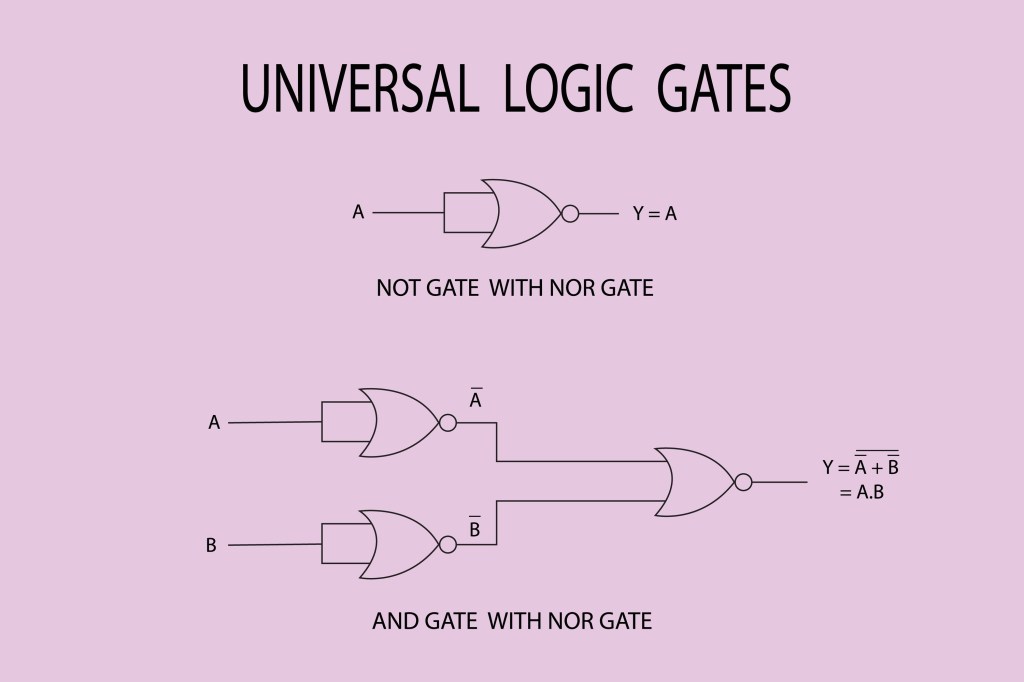
⏳ 6. Gate Delays & Propagation Delay
Even the fastest phone has a tiny “lag.”
- Gate Delay: The time it takes for one single gate to process data.
- Propagation Delay: The total time it takes for a signal to travel from the start of your circuit to the end.
Imagine sending a message on WhatsApp 💬.
- You hit send.
- It travels to the server (Delay 1).
- The server sends it to your friend (Delay 2).The total time is the Propagation Delay.
💻 Sample Program with Delays
Verilog
module GamingController (
    input wire buttonA,
    input wire buttonB,
    output wire jump
);
    // We add a delay of 2 time units using #2
    // This simulates the tiny lag in the controller hardware
    assign #2 jump = buttonA | buttonB;

endmodule
🌈 Summary Checklist
- Modules: The “containers” for our code 📦.
- Ports: The “plugs” that let data in and out 🔌.
- Gate Types: AND, OR, NOT (The decision makers) 🧠.
- Dataflow: Using
assignto connect things like a river 🌊. - Delays: The “lag” that happens in the real world ⏳.


 The Life Navigator